This site will look much better in a browser that supports web standards, but is accessible to any browser or Internet device.


March 25, 2006
Domain Specific Languages, a Renewed Interest
I've seen quite a bit of interest in Domain Specific Languages (DSLs) on the Internet lately. Some good examples include Martin Fowler's exploration of the subject:
* MF Bliki: DomainSpecificLanguage
* Language Workbenches: The Killer-App for Domain Specific Languages?
He does point out that this is not a new idea. He uses Unix as an example of a system that uses a large number of DSLs. The subject has gotten enough interest to reach the point where people are discussing when it is a good approach to apply (Artima Developer Spotlight Forum - How and When to Develop Domain-Specific Languages?). Others are beginning to apply the term DSL to extend their area of interest (Agile Development with Domain Specific Languages).
So, from this we can guess that interest in DSLs is on the rise. As Fowler pointed out, Unix has been a nexus for the creation of DSLs, including:
* make
* regular expressions
* awk
* sed
* yacc
* lex
* dot
and many more.
Recently, I have seen the suggestion that extending or modifying a general purpose language is a powerful way to build a useful DSL. To some extent, this is also well-trodden ground. The classic example of this approach was implemented using preprocessors to provide facilities not present in the original language, both Ratfor (for structured programming in FORTRAN) and cfront (for object oriented programming in C) used this approach.
A recent article, Creating DSLs with Ruby, discusses how the features of the Ruby language make it well suited to building DSLs without a separate preprocessing step. The Ruby language apparently supports features that supports creating simple DSL syntax that is still legal Ruby code.
This is a very powerful technique that is not very easy to do with most languages. Amusingly enough, this technique is also not very new. In fact, there was a general purpose programming language that was designed around the concept of writing a domain language: Forth. If I remember correctly, Charles Moore once described programming in Forth as writing a vocabulary for the problem domain, defining all of the words necessary to describe the answer, and then writing down the answer.
The Forth language is different than most programming languages you might have encountered because it has almost no syntax. What looks like syntax is actually a powerful technique for simple parsing, combined with the ability to execute code at compile time. This allows for extending the capabilities of the language in a very powerful way. One interesting effect of this feature is that many good Forth programmers naturally gravitate toward the DSL approach when solving problems above a certain level of complexity. We firmly believe that some problems are best served by a language, not an arcane set of configuration options.
Forth does give us an important insight into the problems with DSLs, as well. There is is a well-known joke among Forth programmers:
If you've seen one Forth...you've seen one Forth.
Unlike more traditional programming, Forth programs are built by extending the language. A new programmer trying to learn a Forth system needs to learn the new dialect including the extensions used in this environment. This is not technically much different than learning all of the libraries and utility classes used in a more traditional system, but there is a conceptual difference. In Forth (or a DSL-based system), there is no syntactic difference between the extensions and the base language. The language itself can be extended without an obvious cue in the code to say when you have changed languages. This means that a new programmer may not recognize a new piece to learn as readily as when seeing an obvious library call.
This becomes a very important tradeoff: Which is more important, ease of learning for new programmers or power for advanced users? A well-designed DSL gives the advanced user a succinct notation to use to express hie or her requirements concisely and precisely. This is the appeal of the DSL. The downside is that this represents a new set of knowledge for each programmer relating to troubleshooting and debugging. It also requires more care in the design to develop a consistent and usable notation.
As usual, the tradeoff is the key. We need to be able to decide if the benefits outweigh the disadvantages and build the system accordingly. I wish there was a magic formula that could be applied to tell how or when a DSL would improve a system. Unfortunately, I have not seen a sign of such a formula yet.
January 29, 2006
Review of Perl Best Practices
Perl Best Practices
Damian Conway
O'Reilly, 2005
This book is hard to summarize. There is much good advice in this book. Unfortunately, there's also some advice that I found questionable. Conway covers some of important Perl and general programming best practices, including consistent formatting, use of strict and warnings, and the use of version control software. Unlike my standard book on best practices, Code Complete, Conway does not provide much independent support for his assertions. On the obvious best practices (meaning those you agree with), this is not a big issue. However, I did find it difficult to accept suggestions to change coding practices I've developed over almost two decades without any supporting evidence.
Without that evidence, I found some of Conway's arguments to be less than convincing. For example at the beginning of Chapter 2, he states that consistent layout is important, but which particular layout style you use does not matter at all. So far I agree with him completely. Then, he goes on to spend over 25 pages describing his preferred layout style, listing each point as a best practice and spending time justifying his choices. If the particular layout style does not matter, shouldn't we have had one best practice, use a consistent layout style instead of 22 individual layout suggestions elevated to best practice status?
I was also interested to find that more than 10 of the recommended modules were written by Damian Conway. Some of these appear to have been updated on CPAN relatively recently. That makes me wonder how they have had time to become best practice.
Some of his rules appeared to be somewhat contradictory. For instance, we shouldn't use unless because it is not as familiar to many programmers and it is harder to understand complicated boolean expressions in an unless. But, we should use redo to restart a for loop without incrementing the variable when we need more complex flow control. And we should prefer \A and \z in regular expressions, because
They're likely to be unfamiliar to the readers of your code, in which case those readers will have to look them up, rather than blithely misunderstanding them.
Although these suggestions may be good practice and may actually help in writing maintainable code, I find it impossible to detect an underlying philosophy driving this particular set of suggestions.
If you've read this far, you probably have gotten the impression that I hated this book. That is very far from the truth. Damian Conway is a prolific Perl programmer with loads of experience. Much of his advice parallels my own philosophy in writing code, in Perl and in other languages. As I was reading the book, I installed several of his suggested modules and have even modified a few of my Perl programming practices based on his arguments. However, I would be uncomfortable suggesting that a new Perl programmer use this book as the reference on how to program in Perl.
In general, I believe that my biggest problem stems from the expectations I had from the title. If it had been called Damian Conway's Recommended Practices for Perl, I would have been a bit more forgiving. However, by setting itself up as the book on Perl best practices, I feel that the practices in the book need to be more than Conway's recommendations. Supporting evidence or studies would have made it easier to swallow his suggestions where they disagreed with my own practice. Less inconsistency between different rules would have made me more comfortable that he has an underlying strategy instead of listing the part of the language that he, personally, likes. Better disclosure about the modules he wrote and their age, would have made the book feel less like an infomercial in spots.
All in all, I think I would recommend this book to more senior Perl programmers or senior programmers coming to Perl. I would be a little leary of recommending it to novice Perl programmers without some strong suggestions that they take this as one person's view. The really frustrating thing is that I really wanted a book to be the standard I could use to counteract the myth of write-only Perl. Unfortunately, I don't think this book will do that.
All that being said, there is a large amount of good advice in this book. As long as you take the advice with an appropriately-sized grain of salt, this book could improve your Perl code.
January 08, 2006
Accuracy and Precision
When I was getting my EE degree many years ago, one of my professors (Dr. Dave) had an interesting lecture on the difference between accuracy and precision. Even though many people use these terms interchangeably, they are separate concepts. Possibly the most important point of separating these two concepts is remembering that they may be independent. The following diagram shows the difference between accuracy and precision (and is taken from my memory of the lecture).
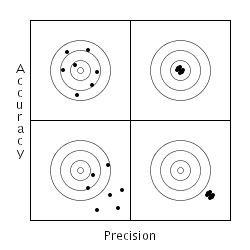
On this chart, accuracy increases as you move upward and precision increases as you move to the right. The upper right corner represents what most people think of when they are talking about either high accuracy or precision. The lower left corner represents what people think of as low accuracy or precision. Interestingly, most people don't think about the other two quadrants.
As programmers, we deal in words and concepts all of the time. There is almost nothing physical about most of what we do. This means that concepts are extremely important to our work. Subtle distinctions in concepts can mean the difference between a project that works and one that fails. In this case, differentiating between precision and accuracy can be quite useful. For example, if you are not accurate, it doesn't matter how precise you are (lower right corner). This is obvious when looking at the bullseye in the picture, but most of us have seen projects where someone tries to fix an accuracy problem by changing from float to double to get more decimal places. Changing data types may change the outcome due to a change in dynamic range, but it usually is not enough to just change the number of significant digits in the output.
Likewise, if an experiment is not giving the right answer, increasing the number of measurements may not change the outcome. More data to average increases the precision, but does not change the accuracy of the answer. Understanding these differences can mean the difference between wasting a lot of time generating a very precise, wrong answer and rethinking an approach to increase the accuracy of the answer.
Amusingly enough, we have all usually run into cases like the upper left corner. We know we have data in the right general area (accurate), but any individual point may vary due to some kind of noise. By averaging a large number of points we increase the precision without affecting the accuracy. Although most of us have a good feel for the mechanics of averaging, making the distinction between precision and accuracy simplifies the discussion of what we are doing. Which leads us to an important observation, simple post-processing of data can increase the precision of an answer, but it rarely changes the accuracy.
Throughout our field, concepts like these mean the difference between making progress and wasting time. Sometimes the differences between concepts are subtle, but that does not make them less important.
December 28, 2005
Diff Debugging
Every now and then, I manage to pull myself away from reading and reviewing computer books (my hobby for the last year) or programming (my hobby for ... never mind), and spend a little time on various weblogs. It's important to see what the names in the field are thinking and talking about.
During one of these late night blog-reading sessions, I ran across MF Bliki: DiffDebugging. This turned out to be a wonderful find, not because the technique was new to me (I've been using it almost as long as I've used version control), but because he gave the technique a useful name.
Fowler explains it much better than I do, of course, but the technique is great for finding regressions in a code base. If you detect a bug in some code you are working on that you know worked before, use your version control software (VCS) to find a version that did not manifest the bug. Then, try to find the last version that did not have the bug and the first version that did. (These should be adjacent versions.) By only looking at what changed between these two versions, it may be possible to find the cause of the bug much more quickly.
I have often used the technique with dates instead of individual commits. This is the easier approach if your VCS does not support atomic commits (CVS, RCS, etc.). If your VCS does support atomic commits (Subversion, etc.), you can test individual commits, which may simplify focusing in on the change.
If you have good unit tests for your software, diff debugging is even faster. You can just run the unit test which shows the bug for each version that you check out. Success and failure are much easier to detect. However, formal unit tests are not required to use diff debugging, since I was using the technique long before I became test-infected. Automated tests do make the technique much easier, though.
One important point that Fowler does not make is that a binary search technique can be pretty useful if the range of versions is large. If you know the code worked a month ago and it doesn't work now, a good approach would be:
- Check out the code from a month ago and verify that it actually worked.
- Check out the code from two weeks ago and see if it worked.
- If it works, check out code from a week later to see if it works.
- If it doesn't, check out code from a week earlier to see if it works.
Repeat this technique with shorter time scales until you find the offending version. Of course, when you are reduced to a handful of versions, it is easier to just step through them (as in Fowler's example). I have often needed to the binary search technique in cases where a standard build and smoke-test procedure was not in place.
The most interesting part of Fowler's blog entry was the fact that he created a good name for this technique. If you don't have a name for something, it is really hard to talk about. It is also not as obvious a tool in your toolkit. By giving the technique a name, Fowler has improved my programming skills by turning an ad hoc technique I have applied in certain situations into a known tool in my programming toolkit. The technique has not changed, but the name makes it a more reusable tool.
This is an interesting fact about our field: concepts are our best tools. Naming a concept gives you the power to use it. Many of the most important breakthroughs in the past few decades have not been new techniques or algorithms, but the naming of techniques so that we can discuss them and reuse them.
November 07, 2005
Maintenance Programmer vs. Original Programmer
In the book Software Exorcism, Bill Blunden described a problem caused by the maintenance programmer not usually being the same person as the programmer who wrote the code. Often the maintenance programmer comes in with a less-than-complete understanding of the original problem or of the design decisions made for this problem. Usually, there are also time pressures that prevent the maintenance programmer from taking the time needed to really understand the code before making changes.
These are all important difficulties with the issue of maintenance programming work. One other issue is that maintenance programming normally goes to less experienced programmers or programmers new to the project/company/etc. This puts the maintenance programmer in a position of having far too little context to always make the best fix for a problem.
Despite these handicaps, many people excel at fixing problems in this environment. In fact, really good maintenance programmers are able to model the design of the code well enough to make actual improvements rather than just patch the old code. In situations where the original design information is available, either through documentation or oral tradition, a good maintenance programmer can do an amazing job of improving code.
In the book, however, Blunden makes the curious assertion that the original developer would know enough to make changes to the project without having to relearn everything, but they are never around. He also points out that there wouldn't be bugs in the programs if the original developers had just done things correctly.
I find these assertions baffling. I have been an original developer and a maintenance programmer. I have also actually maintained code that I wrote for several years after I originally wrote it. I think it is safe to say that each of these assertions is naive at best. Given six months and a complicated enough program, the original developers may not be able to remember why they made the decisions they made. Not all of the design decisions are completely documented. Sometimes nobody wrote the decision down because it was obvious (then), but is actually not obvious a few years later. (I've also seen times when the novel idea was documented, which seems surprising later because the novel idea has become accepted practice.)
This experience is in direct contradiction to Blunden's assertion that the original programmer would be able to trivially fix any bugs in the code. This is also not just my experience, many people I've worked with over the past couple of decades have had similar experiences.
More importantly, the reason for a large number of maintenance fixes in my experience have been due to changes in requirements after the product is live. This means the assertion that if the original programmer had just done things correctly there would be no bugs does not match reality. No amount of careful programming practice could account for bugs caused by changing environments and requirements.
You could make the argument that flexible enough software should have accommodated the new requirements. But, there are a few problems with that. One example that I can think of from my past involves a user interface issue requested by one of our clients. They requested a feature that could be interpreted by the user to work one of two different ways. We suggested a different design that only had one interpretation, but we were overruled. They stated that only one of the interpretations could possibly make sense. We will call that interpretation Approach A. The client asserted, quite firmly, that the other viewpoint (Approach B) would never be reasonable.
Six months later, a bug report came in that stated that this feature was broken. According to the bug report, the feature was not using Approach B, which is the only reasonable interpretation of the feature. We reported back that this was what had been requested, but once again we were overruled. So the code was changed to match Approach B. A few months after that a new bug report came in on that feature that stated in no uncertain terms that we had broken the feature and Approach A should be restored. When the third bug report on this feature came in, we passed all of the emails and documentation of the original feature back to the project manager and the client. We told them that this would be the last time this issue was touched. They had to choose one approach and that was the only change we would make.
This story is obviously an extreme case, but it is nonetheless a true story. No amount of prior planning or careful design can overcome this form of problem. In this case, I had been one of the original programmers and one of the maintenance programmers. So I could pull together the original information and the new requests to allow the project manager to discuss the issue with the client with the relevant information in hand. But other than that, there was no solution to the problem.
Sometimes the changes in requirements that generate fixes come from environmental changes that no one could have predicted. Over the past decade, a large number of programs have been retrofitted to run as applications on the Web. There was no way to predict in 1990 that anything like the Web would take business by storm and that ordinary people would come to depend on it the way we currently do. Despite that, many programs have been fixed to be compatible with the new business reality.
Although I agree that the maintenance programmer is often at a major disadvantage when modifying an existing program. I disagree that the original programmer would necessarily have a major advantage over the maintenance programmer. In some cases, the original programmer can be at a disadvantage if the goal of the software has changed significantly and the original programmer can not let go of his or her original design. The maintenance programmer may find it easier to embrace the new environment and modify the code appropriately.
August 17, 2005
More Human Multitasking
Isn't it funny how you sometimes run into the same concept everywhere at once? A couple of weeks ago, I wrote a piece (Another View of Human Multitasking) refuting some of the conclusions in a Joel Spolsky article on human multitasking. This week, I stumbled across another article, Creating Passionate Users: Your brain on multitasking, that makes pretty much the same points as Joel's essay. Interestingly for me, this essay points to some original research backing up her claims.
As I suspected, the research is specifically related to pre-emptive modes of multitasking. As I stated in my earlier essay, we've known for years that pre-emptive multitasking is not the fastest way to solve problems on a computer either. If the tasks are cpu-bound, every time-slice incurs the task switch overhead. The reasons we use pre-emptive multitasking in computers have little to do with overall processing speed.
As I said in my previous essay, switching tasks when you are blocked is the only way to get more work done in a given amount of time with a multitasking system. Just like a computer, a human can get more done with lower priority tasks that you turn to when the main task is blocked. That way, even when you can't progress on the main task, you can still make progress on something. This is what I have always meant when I say that I multitask well.
Interrupts
One area I did not touch in the previous essay, was the concept of interrupts. When an interrupt comes in, there is a forced task switch just like with pre-emptive multitasking. Unlike a computer, humans cannot store their mental state on the stack and come back to it. An interrupt pretty much makes you lose all of the dynamic state you've built up. Anything you've written down or committed to more long-term storage is retained of course. But, the part that you are working on right now is lost unless you explicitly take time to save it.
This explains why phone calls or random meetings can really ruin your flow. While in flow, it feels to me like I have more of the problem and solution space in my head at one time. It almost feels like I can see a large portion of the problem space spread out in front of me. When an interruption occurs, all of that understanding and feel for the problem space vanishes. There's no time or place to store it. So, once the interrupt is handled, we have to start from scratch slowly building up that information all over again.
July 28, 2005
Another View of Human Multitasking
I've recently finished reading Joel Spolsky's Joel on Software in book form. In the book, I read the essay Human Task Switches Considered Harmful. As someone who has had a lot of experience with multitasking myself, and a fair amount with computer multitasking, I found this claim to be pretty amazing.
I have looked at Joel's claims pretty carefully and believe I see the difference between my experience and his. I suggest you read his arguments before continuing so that I don't accidentally misrepresent what he is saying.
The general gist of Joel's argument is that there are two major problems with multitasking:
- every time you do a task switch, there is overhead
- since neither task finishes early, the average time for completion is higher
These points are both true for computers as well. If we follow his logic for computers, we see that we should never use multitasking on a computer system either. Since we do. there must be some point where the logic breaks down. To my eyes, Joel's argument is a little simpler than the reality I live in. First of all, there are two major times when a system needs to task switch: after a defined time-slice and when blocking on a resource. Joel's analysis is based solely on pre-emptive time-slicing.
Any time a processing system performs a task switch because it ran to the end of its time-slice, we incur the cost of the task-switch overhead. On the other hand, if the task switch comes because we are blocking on a resource, the cost of the task switch is not as important because the current task cannot continue. Another task gets a chance to run sooner than it would have, so the overall time is reduced.
The main purpose for pre-emptive multitasking is to prevent one task from absorbing all available resources (cpu-time) and preventing other critical tasks from completing. This is obviously not the right model for a human, if completing tasks is highest priority. In this particular case, I agree with Joel completely.
This also explains why interruptions are so damaging to productivity. An interrupt forces a task-switch. You incur all of the overhead of changing state, just like in the time-slice case. In fact interrupts are worse for humans than for computers. If you know you will be changing tasks after lunch, you can generally aim for a good place to stop. With an interrupt, you have no choice of when it occurs.
On the other hand, I try to keep one major task and two or three minor tasks on my plate at all times. This way, when something causes me to block on the major task, (waiting on technical or business input, lack of some resource, a design problem that I just can't seem to beat right now) I can spend some time on the minor tasks. Every minor task I complete, is one more thing that actually gets finished. That way I don't spend the blocked time busy waiting (browsing the web, reading slashdot, etc.<grin/>)
Amusingly enough, one of Joel's counter-examples is the case where a project manager sets someone to work on three tasks because there is no way for the programmer to complete them all in the time allotted if he does them sequentially. This example is useful for two insights. The first is obvious, but people forget it in programming too. If you are processor-bound, more threads will not speed things up.
The second is more subtle. Even though it may not make sense from a technical viewpoint, it is sometimes more important to show progress than to complete more quickly. Most modern (general purpose) operating systems use pre-emptive multitasking. This is not to make things faster, which it generally will not do, but to make things more responsive. No matter how resource intensive the main task is, all other tasks get some time. Unfortunately, in business, sometimes it is more important to be moving forward than to complete.
It boils down to trade-offs, like everything else we do. If raw speed is what you need and there is no chance for blocking, Joel's suggestion of one task is definitely best. (Look at most embedded systems). If you have one major task, but there is some chance for blocking, adding a few low-priority tasks can help keep people busy. There is never a technically valid reason for a single person/processor to be scheduled for two or more critical tasks. Although there may be non-technical reasons (business reasons, responsiveness, etc.).
Unfortunately, many people latch on to multitasking just like programmers who are trying multi-threading for the first time. Without being aware of the trade-offs, you can easily make an incredibly slow system.
July 10, 2005
Review of Effective C++, Third Edition
Effective C++, Third Edition
Scott Meyers
Addison-Wesley, 2005
I was really excited when I found out that Scott Meyers was releasing a new edition of Effective C++. The first edition provided a major step on the path for many of us from writing code in C++ to actually programming in the language. What surprised me was the fact that this edition was a complete rewrite of the original. As Meyers puts it, the things that programmers needed to know fifteen years ago to be effective are not the same things we need to know now. Many of the items from the original are no longer new or different, they are the accepted ways to program in C++.
As always, Meyers provides practical advice and sound explanations of his reasoning. Meyers also has an extremely readable writing style that does not get boring after the first chapter. In the first edition, some of the advice went against standard practice of the day, but Meyers did such a good job of explaining his rationale that you had to consider his position. In the latest edition, I found less of his advice to be surprising, but every bit as important. Even though many others have explored some of this territory, I see lots of examples of programmers who violate many of these rules and later regret them. Like the earlier editions, Effective C++, third edition serves as a great description of best practices for C++. Furthermore, if you haven't seen these best practices before, or you were not convinced by seeing some of this elsewhere, Meyers will make a good attempt to convince you.
As with the earlier editions, each item covers a specific aspect of programming in C++ that you must be aware of in order to make effective use of the language. Although it would be possible to gain some of this information by carefully reading the standard reference works, it would be hard to beat the clarity and focus of this book.
One of my favorite items in the book is number 1 where Meyers describes the richness of C++ and some of the pain that comes from dealing with the different facets of this complex language. He suggests treating C++ more as a set of related languages than as a single entity. In the process, he manages to reduce some of the syntactic and semantic confusion by showing consistency within each sublanguage. I am not doing his description justice, you need to read Meyers' version to be properly enlightened.
Meyers does not just focus on usage of the C++ language, he also touches upon important idioms applying to the standard library. He also spends some time on classes expected to join the standard library in the near future, like the Technical Report 1 (TR1) extensions. He also suggests checking out the classes available on Boost.org as a way to see where the language is going.
Another point that impressed me about this book is the level of professionalism in the editing. Lately it seems that spelling and grammar errors have become the norm in technical books. Personally, I find these kinds of errors distracting. I found one typo in the entire book and only a couple of spots where I needed to reread the text to understand what Meyers meant. In today's environment of hundreds of computer books coming out in a year, it is particularly nice to see this kind of attention to detail.
If you program in C++, you need to read this book. Unlike you might have expected, it is not a simple rehash of the earlier editions. Instead it is more of a completely new book in the series. Novice programmers can learn the correct ways to use the language. Experienced programmers can gain better arguments for best practices they are trying to establish and insights into practices they may not be as familiar with.
I can't possibly recommend this book too highly.
May 30, 2005
Joel on Exceptions
As I said in Joel on Wrong-Looking Code, I find Joel on Software to be a good source of information on programming. However, I don't always agree with him. In Joel on Software - Making Wrong Code Look Wrong, Joel states that he does not like exceptions. He also refers to a previous article Joel on Software - Exceptions, where he first talked about his dislike of exceptions.
Rather than attempting to explain his rationale, I suggest that you read his essays before continuing. I think he makes some valid points and argues his case well, even though I disagree with his conclusion. I do not intend to try to prove him wrong, but to give a different view of exceptions based on my experience and understanding.
Joel's arguments against exceptions fall into five categories:
- the goto argument
- too many exit points
- it's hard to see when you should handle exceptions
- not for mission critical code
- they're harder to get right than error returns
And, just to show that I'm not blindly defending exceptions, here's a few that he didn't cover.
- not safe for cross-language or cross-library programming
- possibly inconsistent behavior in threaded programs
- lack of programmer experience
Let's go over these points one by one.
The goto Argument
Let's start with the goto argument. Joel states that exceptions are bad because they create an abrupt jump from one point of code to another (from Exceptions, above). He does have a point. However, the if, else, switch, for, and while all create jumps to another point in the code. For that matter, so does return.
The original letter about the go to did not refer to every kind of branch in code. The fact is that Djikstra did state that limited forms of branching like if-else statements or repetitions like while or for don't necessarily have the same problems as the go to, His point was that unconstrained jumps to arbitrary locations make reading the code almost impossible.
The thing that separates an exception from a go to is the limits placed on where the exception can transfer control. A thrown exception is in many ways, just a variation of return. It may return through multiple levels (unwinding the stack as it goes), but an exception does not jump arbitrarily in your code.
Obviously, we wouldn't be willing to give up if in order to remove an abrupt jump to another place in the code. The difference between the goto and the if is limits. The if is constrained in where it is allowed to jump. Likewise, any exception is only allowed to transfer control back up the call stack.
While it is obvious that throwing an exception is more powerful than an if, it should also be obvious that it is much more constrained than an arbitrary go to construct. So the comparison of exceptions to go to is at best an appeal to emotion. Unfortunately, it is an argument I've seen far too often.
It's Hard to See When You Should Handle Exceptions
In Joel on Software - Making Wrong Code Look Wrong, he states that one of the reasons he doesn't like exceptions is because you can't look at the code and see if it is exception-safe. Given his earlier statement about how important it is to learn to see clean, I find this statement particularly interesting.
Although I understand Joel's commentary about the difficulty of making certain that code is exception-safe, I maintain that a good use of exceptions can help create cleaner code, that is easier to maintain. The key to creating exception-safe code is using the guarantees provided by the exception mechanism. Unlike Java, C++ makes a hard guarantee, Any local variables are destructed properly when an exception leaves the scope they were created in. This has lead to the resource allocation is initialization idiom (RAII). I'll use Joel's example to explain:
   dosomething();

   cleanup();
This actually jumps out at me as incorrect code. What am I cleaning up? This sounds like either a resource cleanup issue or a dumping ground for a collection of things that happen to be done at this time. If it's the first case, code probably looks more like this:
   setup();

      ...

   dosomething();

   cleanup();
In which case, the RAII approach would be to create an object that manages the resource. The equivalent of setup() is the object's constructor. The equivalent of cleanup() is the object's destructor. This changes the code to:
   Resource  res;

       ...

   dosomething();
This code is safe in the face of exceptions and cleaner to boot. More importantly, in my opinion, the setup and cleanup of the resource is now defined in the one right place, the definition of this class. Now if I ever use the resource, I'm guaranteed that the cleanup code will be called at the appropriate time. There's no need to remember to call cleanup() at the right times.
Unfortunately, this idiom will not work for Java, since that language specifically does not promise timely destruction of objects. In that case, as Joel points out, you are required to use the try ... finally mechanism to ensure cleanup. For this reason, Java does not always allow exceptions to clean up the code.
Not For Mission Critical Code
Joel goes on to suggest that exceptions would not be useful on larger or more critical systems. In fact, a large portion of my career has been focused on long running programs (including systems with 24x7 uptime requirements). What I've found is that the code without exceptions tends to fail in strange ways because error returns are tested inconsistently, and error codes are handled differently in different places in the code. Keeping all of these different places consistent requires a large investment in time as the code changes.
Now, one could make the argument that if all of the error returns were tested and if all of the errors were handled consistently and properly, the error-return based programs would be perfectly robust. Then again, you could also make the argument that if the exceptions were all handled correctly, the code would be perfectly robust, too.
The main difference here is that if the programmer does nothing, error returns are lost by default and exceptions terminate the code by default. For this reason, exceptions tend to be more likely to be handled because they would otherwise terminate the code. If an error return check is accidentally left out, no one may notice and testing may not point out the problem. If an exception is not caught, the program is likely to terminate during testing and, therefore, the problem will be found.
I do realize that either error returns or exceptions can be ignored or handled badly by any particular programmer. But in my experience, exceptions have been harder to ignore. While I probably would not say that exception code is easier to get right than error return handling, I would say that error return code is easier to get wrong.
Harder to Get Right Than Error Returns
Handling error returns explicitly in the code tends to increase the amount of error handling code spread throughout the program to the point that it hard to see the actual code logic for the error handling logic. I agree with Joel that your best programming tool is the pattern recognition engine between your ears. I find it much easier to understand and fix code logic if I can see it, without a large amount of extraneous code in the way.
In many ways, error return checking and handling code (if done completely) can obscure the main logic of the code to the point that maintenance becomes a nightmare. To extend Joel's cleanup example a bit, let's see what error return checking code does when you need to perform cleanup.
    setup();

    doSomething();

    doSomethingElse();

    doOneMoreThing();

    cleanup();
Let's say that each of the functions above returns an error condition that we need to check. Let's assume further that we need to return the error from this routine. Finally, we will need to perform the cleanup in any case. So the code might end up looking like this.
    ErrorType err = SUCCESS;

    if(SUCCESS != (err = setup()))

    {

        // no need to clean up.

        return err;

    }

    if(SUCCESS != (err = doSomething()))

    {

        cleanup();

        return err;

    }

    if(SUCCESS != (err = doSomethingElse()))

    {

        cleanup();

        return err;

    }

    if(SUCCESS != (err = doOneMoreThing()))

    {

        cleanup();

        return err;

    }

    cleanup();
or like this
    ErrorType err = SUCCESS;

    if(SUCCESS != (err = setup()))

    {

        // no need to clean up.

        return err;

    }

    if(SUCCESS != (err = doSomething()) ||

      SUCCESS != (err = doSomethingElse()) ||

      SUCCESS != (err = doOneMoreThing()))

     )

    {

        cleanup();

        return err;

    }

    cleanup();
or any of several variations on this theme. In any case, the call to cleanup() ends up duplicated.
In my experience, anything that is duplicated will probably be left out at some point during maintenance. More importantly, if the cleanup is more than one statement instead of a single function call, the different places where it is written are likely to get out of sync. Careful code reviews can reduce this problem, but it still hangs over the process.
More importantly, to my mind, is the fact that the actual logic of the program is now obscured by the mechanics of the error handling. This is the problem that exceptions were created to reduce.
If we once again apply the RAII idiom this code becomes.
Resource res;
doSomething();
doSomethingElse();
doOneMoreThing();
In this code, it is much easier to see the main line of the logic. What you can't see is exactly what exceptions might be thrown. But, the original code did nothing specific with the error returns, it just passed on the error condition to the calling code. This code does the same, it just does it in terms of exceptions.
Cross-Language/Library Programming
Unfortunately, the C++ standard cannot promise compatibility of exception across language boundaries. There are almost no guarantees if your C++ code calls a C routine that uses a C++ callback that throws an exception. Obviously, this is not a situation you'll run into every day, but it is a problem. This issue may also apply to JINI code that uses C++.
A bigger problem is the fact that exceptions are not necessarily binary-compatible between modules, even in C++. It is possible for a library compiled with different options to produce exceptions that do not quite match the exceptions from the rest of the code. (See C++ Coding Standards for the details.)
In the worst case, this just means dealing with error codes at the boundaries of these two cases. So it is no worse than dealing with error returns normally.
Behavior in Threaded Programs
Some C++ implementations may have difficulties with exceptions thrown in threaded code. In the past, I've seen exceptions improperly propagated into the wrong thread. Most modern C++ compilers and libraries should have solved these problems. As far as I know this has never been a problem in Java.
Lack of Programmer Experience
This is probably the biggest problem with exceptions. A large number of programmers are not very experienced in using exceptions correctly. I've seen exceptions used in cases where an if or switch would have been much more appropriate. I've seen cases where an exception was caught as a generic exception and then a series of type tests were performed in the catch block. I've seen people use empty catch blocks to ignore exceptions.
The solution to this problem is education and experience. Unfortunately, this one takes time. Fortunately, many of the bad practices above can be found relatively easily in code reviews.
Conclusion
I would like to conclude this (overly long) essay with a summary. My goal in this essay was not to prove Joel Spolsky wrong in his dislike of exceptions. My purpose is to give an alternate view. My experience has shown (to me at least) that there is quite a bit of truth in the arguments against exceptions. On the other hand, I have seen several cases of exception usage increasing the robustness and correctness of large and small programs.
To link this back to Joel's essay, the main issue here is the need to learn to see well-done exception handling. This is something that out industry needs a lot of practice with. However, exceptions are a powerful tool and ignoring them may not be a viable technique in the long run.
May 23, 2005
Joel on Wrong-Looking Code
I want to preface this article with the comment that I really enjoy reading Joel on Software. I find his essays to be knowledgeable, well-thought-out, and well presented. While I don't always agree with his conclusions, I always feel that any of his articles is worth a read.
So, recently I ran across Joel on Software - Making Wrong Code Look Wrong. The title looks like something I've tried to explain to junior programmers before, so I figured I'd take a look. If nothing else, I thought he would give me new arguments to use. You should definitely read his essay before continuing. I want to be sure not to ruin his set up and delivery. I also want to make sure that you understand his points before I explain where and why I disagree with him.
The essay started off with some commentary on code cleanliness and an interesting anecdote from his early work life. So far, so good. Then, he throws in his curve ball. In this essay, he plans to defend Hungarian Notation and criticize exceptions. I have to admit that I thoroughly dislike Hungarian Notation and I find exceptions to be a pretty good idea. If anyone else had stated this as a goal, I probably would have just left the page. I've got plenty of other stuff to read. But, this I had to see.
After an interesting example, Joel goes on to explain that what we all know as Hungarian Notation is actually a corruption of the original Hungarian Notation. The original does not add a wart for type, which is useless and leads to bad code. It added a prefix for the higher level concept that the variable represents. A good simple example is using col on the front of any variable referring to a column, and row on variables referring to rows. This makes it obviously wrong when you assign a row value to a column. The goal is to add semantic information into the variable name. Unlike, syntactic information there is no way for the compiler to help you with the semantics. This version of Hungarian Notation actually has the possibility to help programmers, rather than just creating unreadable variables.
The funny thing from my point of view is that this idea is the only vestige of Hungarian Notation that I kept from a brief stint of using it years ago. Apparently, I (and probably loads of other programmers) accidentally stumbled across what Simonyi had originally intended, despite loads of literature and examples misusing it. So, by the end of this part of the article, I find myself agreeing with Joel, despite the fact that I was adamantly against what I thought was his position.
As the article continues, Joel goes on to bash exceptions (his words, not mine). In keeping with the topic of his essay, he states that one of the reasons he doesn't like exceptions is because you can't look at the code and see if it is exception-safe. Given his earlier statement about how important it is to learn to see clean, I find this statement particularly interesting. Since it would take another whole article to refute all of his points, I'll save that for another day.
May 17, 2005
The Importance of Programming Play
For various reasons , I've recently been thinking on the importance of programming play, Those times when we tinker with code without any goal other than making something run on the computer. Sometimes this involves playing with a new language or a feature of an old language that we've recently discovered.
Unlike projects for work, these exercises rarely produce any grand system that makes money or provides services. Often they result in minor amusements, small tools, or throw-away code. The main purpose of the exercise is stretching our programming muscles. Trying out a new technique or feature without the pressure of having to succeed gives you the opportunity to stretch in ways you can't when a deadline is looming. Not having a deadline also allows you to experiment with ideas that may be too risky for production use. Like brainstorming, this appears to be a very effective way of developing new approaches and keeping sharp.
Lately, it seems that many programmers that I know and ones I read have lost sight of this simple pleasure and its importance. But, many of the best programmers I've known were always playing with code. They have numerous little side projects going on, some of which will never be completed. Some are huge, ornate systems and some are little utilities. The main thing they all have in common is that the main goal of each of these projects is enjoyment.
Fortunately, not everyone in our field has forgotten. In Fun, Simon St. Laurent talks about the thing that got him into the field. Dave Thomas suggests the concept of programming Katas as a way to keep your skills sharp. These are more exercise than play, but the goal is the similar. In the book Slack, Tom DeMarco explored some aspects of this issue. The Perl community has had a long-standing tradition of playing with code including the Obfuscated Perl Contest (which has it's origins in a similar contest for C) and Perl Golf.
The key point here is that programming is a creative activity. It is hard to be creative without taking risks and trying wild ideas. In our day jobs, we very rarely have the opportunity to risk a project on a wild idea. (At least not more than once.) But when you are playing, you have that chance. The only thing you risk is some time, and whichever way the idea goes you gain experience. Trying and refining wild ideas gives us new techniques that can be used when we really need them.
December 12, 2004
Origin of The One, Right Place
Back in September, I talked a bit about The One, Right Place and what a useful concept it is. I'm now reading the second edition of Code Complete and ran across this concept once again. More importantly, McConnell references the book where I first read about the concept: Programming on Purpose: Essays on Software Design. This was the first of three books collecting together articles by P. J. Plauger from Computer Language magazine.
The fact that I had forgotten the origin of the One, Right Place tells me that it's time to re-read these books. Hopefully, I'll get a chance soon and can review them properly for my site.
October 29, 2004
"All you have to do is..."
What is it about the programming field that makes everyone believe that it is easy? I can't count the number of times I have had someone tell me:
- All you have to do is...
- How hard can it be? You just...
- It won't take that long. It's just a little program.
- etc.
Most of these people have never written a line of code in any language. Many of them only hve a vague idea of what a programmer does.
I sometimes wonder if other professionals get this. When a patient disagrees with a doctor's opinion, he may get a second opinion. I doubt he would say "All you have to do is a little surgery, how hard can that be?" When someone is hiring a company to build a house, they probably don't tell the contractor "Oh it couldn't possibly take that long. After all, I've told you everything you need to know. Just go build it."
When dealing with most professionals, you may not agree with their decisions, and you may go with a second opinion or, even a third; but you normally make the assumption that they know their field. They might not have all of the particulars nailed down in their first estimate. You don't expect them to change their estimates by a factor of ten just because you want it.
But in software development, this seems to be the norm. Customers, salesmen, and even some managers expect to be able to override a programmer's professional opinion on a whim. Some might say that our estimates are more fluid because no one understands software as well as, say, bridge building. I would point out that people rarely overrule a doctor's professional opinion, even though I've had my share of diagnoses that weren't any better than a wild guess.
In addition to the professional aspects of this problem, it spills over into everyday conversation. In my experience, people always seem to assume that what I do for a living is easy. They come up with an idea that will make them big bucks and I should be able to make it happen in a few days for less than a hundred dollars. Many of them seem offended when I don't volunteer to give up my weekends and evenings to make their dream a reality.
Even professional customers (and employers) want to be able to negotiate time estimates and costs. It seems they believe that their five minutes of thought means more than the years I have spent working in the field.
I know others have had this experience, and I would like to know: does anyone have a good technique for explaining this idea to a potential customer. How do we make people understand that the programs we write are real, even though you can't touch them? How do we get across the mind-boggling complexity of even relatively simple problems?
Maybe it's just that the field is so new that people don't have a grasp of what it takes. If I told you it would take me a year to design and build a new car from scratch. No one would try to convince me that it should only take 6 months. (Although, they might suggest I was nuts and it would take more like two or three.) So, why should a program with even more individual moving parts seem trivial.
It does tend to make one think.
September 19, 2004
The One, Right Place
Many years ago, I spent a lot of time training entry-level programmers. One of the problems that the more junior programmers had was duplicating code and information in the code. Some of our senior programmers at the time began talking about the concept of the one, right place. Later, I read the book The Programmatic Programmer and saw their concept of Don't Repeat Yourself (DRY). For a while, I switched to their definition. I've finally come to the conclusion that the one, right place and DRY are two similar, but not quite identical ideas.
The one, right place refers to the one place in a piece of code where a piece of information belongs. When this information is stored in many places, the code is harder to understand and maintain. The key point here is that there is a right place for the information. There may be other places where the information can be stored, but those places may not increase the understandability or maintainability of the code.
The DRY principle covers the concept that a piece of information should only be stored in one place. But no mention is made of whether any place is better than another. In particular, Hunt and Thomas state that
Every piece of knowledge must have a single, unambiguous, authoritative representation within a system
Although you could gather that there is assume that there is a right place for this representation, that requirement is not explicitly stated. As such, someone could claim to be following the DRY principle when storing a piece of knowledge in a one, wrong place. This person might resist changing the authoritative reference because of the DRY principle.
One way to tell if you have the one, right place or a wrong place is if the information ends up being duplicated during maintenance. I've seen this where the authoritative copy of the information cannot be referenced without generating references to a large amount of unrelated information. In order to decrease the unnecessary overhead, a new copy is made. At that point both DRY and the one, right place have been violated.
The one, right place extends DRY to include some design relating to the location of that information. We should not need to include dozens of headers (in a C++ program) in order to get the size of a single data structure. We also should not need to include references to a GUI subsystem to access a thread function. When these kinds of knowledge are coupled together unnecessarily, we may be following the letter of DRY, but we are violating the spirit of the principle.
The one, right place is the spirit of the DRY principle.
September 07, 2004
Coding Standards
At different times in the past I've either agreed with or fought the application of coding standards. Recently, I've been looking at the subject again. In a wonderful case of timing I stumbled across an ad in CUJ (10/2004) for CodingStandard.Com. They have a coding standard for C++ that seems to cover much of what I was looking for.
Later in the same issue, the Sutter's Mill column had some more advice from the upcoming book C++ Coding Standards by Herb Sutter and Andrei Alexandrescu. In this column, they suggest not standardizing personal preference issues (indenting, brace placement, etc.).
This lead me to a useful concept that I need to explore further. What I've normally called a Coding Standard is actually two documents.
- Coding Standard
- This document covers the rules that increase quality and maintainability of the code. This includes subjects like when to
throwexceptions and the usage of RAII. Most of the items that we call Best Practices fit here. - Style Guide
- This document establishes style preferences to reduce incidental differences in the code. This includes brace placement, indenting, CamelCase vs. underscores, etc.
The important point is that most of the religious debates I've seen fall into the second document. Additionally, most of the stuff in the second document is a matter of preference, there is very little evidence that one style is significantly better that another. On the other hand, the items in the first document are usually demonstrably better than their alternatives.
By separating the two documents, we might be able to get two major benefits:
- Don't avoid the best practices because you don't like the style of the second.
- Allow the styles to change as needed without invalidating the standards.
This division also better reflects the purpose of the two sets of rules.
"Good Enough" Revisited
In The Forgotten Engineering Principle, I went on at some length about the concept of "Good Enough". I originally began thinking about this idea over a decade ago in the context of Stylus-Based Computers (what are now called Tablet PCs). I hadn't thought about the concept for quite a long time.
However, in doing a little research for another issue I found that I had been reminded of this concept just a few years ago. Unfortunately, I had forgotten that I had been reminded. Andrew Hunt and David Thomas devote a small portion of The Pragmatic Programmer to the concept of Good-Enough Software. Even if I didn't remember it at the time, I'm appreciate that they moved the concept back into memory far enough to keep me thinking about it.
So, in the Credit Where Credit Is Due department, Hunt and Thomas reminded me of this concept so they should get credit for some of anything good you might get out of my essay. I, of course, claim credit for anything you disagree with.
August 26, 2004
The Forgotten Engineering Principle
Over the last few years, I've been frustrated with the "Software Engineering" industry. I was actually trained as an engineer, and much of what I see passed off as software engineering is not engineering. I've been mulling this over for some time without being able to put my finger on the part that bothers me. I think I know what it is, but I need to warn the process people and the methodology people that they should read to the end before disagreeing. This concept is not hard to understand, but I'm pretty certain my writing skills aren't up to making this impossible to misunderstand.
The forgotten principle is the concept of Good Enough. Engineering has never been about making something perfect, it has been about making it good enough. By good enough, I don't mean shoddy. I don't mean cheap. I mean exactly what I said, good enough. Now I'm sure some out there are beginning to mutter something about "undisciplined, cowboy coder," but bear with me.
"Good Enough" in Electrical Engineering
I was trained in electrical engineering, so let's start by looking at good enough in those terms. One component that everyone has at least heard of is the transistor. Most people understand that transistors are used to make amplifiers and that they are used inside CPUs. What people don't realize is that, except in very special circumstances, transistors make lousy amplifiers.
A transistor has several modes of operation. In one mode, the linear region, the transistor performs pretty well as an amplifier. At the edges of this region or outside that region, the transistor's behavior is non-linear. However, some engineer decided that if we could constrain the input and limit the amplification, we would gain a small component that amplifies well enough to be useful. Over the years, several variant transistors have been developed that have somewhat different linear capabilities, by tying different transistors together and making use of the "good enough" capabilities we have very good transistor-based amplifiers.
Outside the linear range, transistors work sort of like voltage-controlled switches. The problem was that they leaked current when they were turned off. They also tended to act as amplifiers when they passed through this "linear region" in the middle of their range. But, once again, some engineers decided that the transistor worked "enough" like a switch to do the job. Over time, the designs were refined and we now have transistor-based CPUs in desktop machines that have operating frequencies in excess of 2GHz.
If the people investigating transistors had taken the original transistor and tried to use it in a 2GHz CPU design or in a fancy multistage ammpilfier for CD-quality sound, they would have given up in despair. There is no way that the early transistors could have worked this way. But they realized that the current design was good enough to use in some applications, and they trusted that it could be improved given time.
There are numerous other components and circuits that have similar histories. None of them behave in a perfect fashion. But, in a controlled environment, these components perform well enough to do useful work.
"Good Enough" in Engineering
In engineering, almost every problem has a huge number of constraints and requirements. Many of these requirements are mutually exclusive. Engineers look at various constraints and compare requirements and find tradeoffs to try to meet all of the requirements well enough to allow the product to be built.
When automotive engineers are designing a car, they have to design for safety. They could design a car that is perfectly safe. You could design one that contains special cushioning that can support every part of the body in any kind of collision. In addition, we could make the car so that it has built-in life support for use in case the car goes under water. While we are at it, let's limit the top speed of the vehicle to 5 mph. Obviously, this would be safer than anything on the road. But, no one would buy it. First of all, it would cost too much. Second of all, we could not use it to get anywhere in a reasonable amount of time.
Anybody who has had foundation work done has probably wondered why the house wasn't built better in the first place. If you can repair the house so that the foundation is in good condition, why couldn't it have been built that way in the first place? I talked with an engineer that inspects foundations about that subject a short while back. He pointed out that the changes to solve this problem are well understood and a builder could easily add them the the construction of a house. Unfortunately, that change would significantly increase the cost of the house. Sure, you would like to have a house that would never have foundation problems. But, are you willing to pay three times as much to protect yourself from something that might happen in ten or twenty years? What if you move before then?
"Good Enough" in Computers
Shortly before I began developing software, a little revolution was going on in the computer world. Any serious computer work was being done on mainframes or mini-computers or on supercomputers. Mini-computers were slowly taking the market that mainframes had enjoyed. There had been quite a bit of excitement about microcomputers and the Personal Computer had only been out for a short time.
Many people, including IBM, expected the PC to be a toy. There was no way this toy would ever compete with the big machines. What many people found was that the PC was good enough to solve their problems. Obviously it didn't have the power of one of the bigger systems. In might need hours or days to solve a problem that would take minutes on a bigger piece of hardware. But, since it was in your office, you didn't need to wait days or weeks to get access to the big machines that others were sharing. And although it couldn't do everything that the big machines could do, the PC was good enough to "get my little job done".
Probably the best "good enough" story has to be the World Wide Web. Many people had looked at large Hypertext systems before Tim Berners-Lee. All of them had been stymied by one fundamental problem: How do you keep all of the resources synchronized? If there are dozens of computers in the network participating in this system, how can you make sure that all of the resources are constantly available.
Berners-Lee took a slightly different view. If we have some way to report a connection as failed and most of the links are available most of the time, maybe that would be good enough. He developed a simple markup language that provided good enough quality content and deployed the first web servers and browsers. Despite the annoying 404 problem and the fact that the early pages were basically ugly, the Web caught on and spread like wildfire. Obviously, a good enough reality was much better than a perfect theory.
Missing "Good Enough" in Process
Lately, some in the software engineering field seem to have lost this concept of good enough. More and more time and money are applied to create the perfect process that will allow for perfect software to be developed. People seem to think that more process will solve all of the problems. Anyone who questions the process is a heretic that wants to just hack at code. But, the fact of the matter is that in every other engineering discipline process supports the engineering principles, it doesn't replace them.
The principle of good enough, is an application of judgement to the problem. We could spend an infinite amount of time optimizing any given requirement. But a good engineer looks at all of the requirements, applies his/her experience, and says this part of the solution is good enough, we can move on. Some of the "process" in other forms of engineering serves to document that judgement call in a way that can be checked later.
Missing "Good Enough" in Design
Process isn't the only issue. Many people seem to be obsessed with big do-everything frameworks. Even simple work is performed using massive frameworks of cooperating components that will handle your little problem and any that you might scale up to. Companies have been built on using these big tools for solving hard problems. Consequently, some people feel the need to apply this big hammer to every problem they encounter.
Not every problem should be solved with a robust web-application. Not every web-based application needs J2EE. Not every data transfer needs an advanced XML application with full XML Schema support. Sometimes a good enough solution this week is better than the be-all-and-end-all solution two years from now.
Conclusion
You may wonder what all this means to you.
The next time you find yourself designing a huge multi-tier, system with clustered databases, stop and think about how little would be needed to solve your problem. Sometimes you may find that you can get away with a static output updated once a week instead of an automatically generated report with 24-7 availablility.
On the other hand, looking at the problem from another direction may force you to look more carefully at your tradeoffs. This may help you focus on what's really critical. This is the path to doing real engineering.
July 06, 2004
Review of Compiler Design in C
Compiler Design in C
Allen I. Holub
Prentice Hall, 1990
I decided to take a break from the relatively new books I've been reviewing and hit a real classic.
Over a decade ago, I saw Compiler Design in C when I was interested in little languages. A quick look through the book convinced me that it might be worth the price. I am glad I took the chance. This book describes the whole process of compiling from a programmer's point of view. It is light on theory and heavy on demonstration. The book gave an address where you could order the source code. (This was pre-Web.) All of the source was in the book and could be typed in if you had more time than money.
Holub does a wonderful job of explaining and demonstrating how a compiler works. He also implements alternate versions of the classic tools lex and yacc with different tradeoffs and characteristics. This contrast allows you to really begin to understand how these tools work and how much help they supply.
The coolest part for me was the Visible Parser mode. Compilers built with this mode displayed a multi-pane user interface that allowed you to watch a parse as it happened. This mode serves as an interactive debugger for understanding what your parser is doing. This quickly made me move from vaguely knowing how a parser works to really understanding the process.
Many years later, I took a basic compilers course in computer science and the theory connected quite well with what I learned from this book. Although the Dragon Book covers the theory quite well, I wouldn't consider it as fun to read. More importantly, nothing in the class I took was nearly as effective as the Visible Parser in helping me to understand the rules and conflicts that could arise.
Although this book is quite old, I would recommend it very highly for anyone who wants to understand how parsers work, in general. Even if you've read the Dragon Book cover to cover and can build FAs in your sleep, this book will probably still surprise you with some fundamentally useful information.
The book appears to be out of print, but there are still copies lurking around. If you stumble across one, grab it.
June 04, 2004
Troubleshooting and Optimization
In LinuxDevCenter.com: Tales of Optimization and Troubleshooting [Jun. 03, 2004], Howard Feldman presents three examples of troubleshooting and fixing bottlenecks.
One thing I really like about this article is the methodical way the author goes about solving these problems. Having tried to teach troubleshooting to entry-level programmers, I know that it is very hard to get them to walk through the problem. Most inexperienced developers (and some experienced ones), want to jump immediately to a solution without doing the drudge work described here.
The author does a great job of showing how you measure the problem, and then think about the problem to solve it. Too many people try to make a quick fix based on too little information.
May 31, 2004
On Creative Class Names
The subject of naming in code continues.
In O'Reilly Network: Ill-monikered Variables and Creative Class Naming [May. 18, 2004], Tim O'Brien adds his comments to the topic of naming in programs. He picks up with Andy Lester's earlier comments and goes a little further.
O'Brien makes the suggestion that creative names are much better than mundane object names. His best example was the use of Bouncer instead of SecurityFilter. In some ways, I agree with him. The purpose of a name in code is to convey intent to the reader of the code. The computer doesn't care what you name things, but the next programmer to read it will depend on names to tell him/her what the code is intended to do.
That exposes the one problem I have with this suggestion. Each name you can choose brings with it more than just its definition. A class called Bouncer brings with it a host of subtle shadings of meaning. In his example, a Bouncer would check for valid ID and reject any request that fails this test. However, a real Bouncer is also often charged with throwing out rowdy customers even if their IDs were valid. A real Bouncer would also recognize troublemakers that have been problems before and deny them access, regardless of their IDs.
The problem with his suggested name is the extra responsibilities that are attached to it. Does the Bouncer object just check IDs? Or does it support monitoring activities? Does it have the ability to throw out disruptive requests, or support the ability to have a manager order it to bar a request for other reasons? Should the Bouncer class maintain a list of rejected clients in order to reject repeat offenders.
The problem with a creative name like this is that it may lead the reader to assume (consciously or not) that the class has abilities and responsibilities that it doesn't have. If the class does have multiple related responsibilities, a clever name can simplify understanding. But if the class has only one of the possible responsibilities, the name may cause more confusion than good.
I agree that many people writing code don't apply any imagination to the question of naming. However, some classes don't have creative names because the programmer wants to specifically limit the implied promise of the class's responsibilities.
Despite what I say above, I think that creative names are a very important tool for use in writing code. Coming up with the True Name for a class will make maintaining and using the class much easier as time goes by. But a clever name is not the same as a good name. Some really good names aren't clever, they are obvious. Some really clever names are useless. If the clever name already has an accepted meaning in the field, using it might cause more confusion than it is worth. As with everything else in this field, the tradeoffs are the key. When the creative name makes the code or concepts clearer, I'm all for it.
O'Brien's suggestion of using a thesaurus is a good one. Finding a good name with the right connotations can get all of the benefits that O'Brien suggests.
Choosing a name just because it might sound good to "management" (or whoever) won't be a good idea if that person makes an assumption, based on the name, that is not true. After all, if one Bouncer is a good idea, maybe we can employ two or three and then we don't need any other kind of security. Even better, the Bouncer will probably remember the troublemakers and not let them back in. Obviously, these kinds of assumptions could lead to very different expectations of what the software is expected to do.
May 26, 2004
The Fallacy of the One, True Way of Programming
What is it about programmers that cause them to latch onto one approach and try to apply it to every problem? Maybe it's a characteristic of people in general. Each new paradigm, methodology, or even language seems to grab hold of many programmers and make them forget anything they ever knew. They seem to develop an overwhelming need to re-implement and replace all that came before the new tool.
This isn't always a bad idea. Done deliberately, this technique can help you evaluate a new methodology or language by comparing the solution of a known problem with a previous solution of that problem. Unfortunately, many of us seem to assume that the new way is better and apply the new approach despite any evidence that it does not solve the problem more effectively.
Over time, I've come to the conclusion that there is no One, True Way of Programming. This is not my own insight. I have read this and heard this from numerous people with more experience. Earlier in my career, I did not believe them. I didn't disagree, I just didn't believe. Through experience with multiple paradigms, languages, and methodologies, I've finally come to understand what those senior people were trying to say.
Multiple paradigms are different tools in my bag of tricks. Each language is another tool that I can apply to a problem. Different methodologies give me different approaches to solving a problem. But, in the end, no single set of these tools can help me solve all problems. Each combination has strengths and weaknesses. One of the most important skills we can develop is the ability to recognize the right tool for the job.
Many years ago, I saw this point made in a book. (One day I'll remember which book.) The author pointed out that very different techniques and processes are needed when you are building a skyscraper and when you are building a doghouse. The author pointed out that the techniques that would be used to architect a skyscraper are not cost-effective when building a doghouse. I think I would now go a little further and suggest that the techniques are not appropriate, and that cost is one easy measure of why they are not appropriate.
May 12, 2004
Flow and Miller's Magic Number
Recently, I stumbled across Mental State Called Flow and was reminded of an idea I had about flow and Miller's Magic Number. When in the state of flow, I've sometimes had the experience that the problem I was working on was much easier to understand than it seemed to be when I was not in flow. In observing and talking to other programmers, I've come to the conclusion that this is not an unusual experience.
Several years ago, I worked with a senior programmer who always seemed to be in flow (or hacking, depending on who you asked). Unfortunately, the code he wrote was often difficult to understand. After a few years, I made a breakthrough. I could usually understand his code while in a state of flow. While in flow, not only I could understand his code, I could also refactor it into a form that I (and others) could understand under normal circumstances. Other programmers in the group had similar experiences.
One day, everything seemed to come together in a blinding flash. During flow, Miller's Magic Number is larger. Normally this number appears to be around 7 chunks of information that you can deal with at one time. But during flow, the number of chunks seemed to be much higher. I have no idea how large the number is, but problems that seem to be at the edge of my ability normally are quite easy to deal with while in flow.
This means that flow can have a downside. If you are not careful with how you write the code, this larger number of information chunks will always be required in order to understand the code. You have probably seen this phenomenon in code that was written as part of a long hacking run. It usually works, sometimes even works very well. But you can't quite make sense of why it works like it does. This may be one of the reasons that hacking code has gotten such a bad name. Code like this is nearly impossible to maintain.
However, you can use this enhanced facility to understand the problem and still strive for simple, elegant code. The result is code that solves a difficult problem in an obvious way. Much of the time, this solution is only obvious in hindsight. You required more information while working on the problem than you normally could handle in order to see the simple and obvious solution.
In the Jargon File, the term hack mode is used to describe this form of flow that particularly focuses on The Problem. I believe the ability to use the benefits of the increased magic number, without making your code require this concentration to understand is one of the more important skills to learn in programming.
May 01, 2004
Idiomatic Programming
Like any natural language, most programming languages support idioms. According to the American Heritage Dictionary of the English Language, an idiom is
A speech form or an expression of a given language that is peculiar to itself grammatically or cannot be understood from the individual meanings of its elements, as in keep tabs on.
Programming idioms can, of course, be understood functionally from its individual elements. The interesting thing about most programming idioms is what they say to the programmers who will read the code later. A programming idiom can reveal many things about the author of the code. To some extent, the idioms you choose are a function of your understanding of the language, what you may have been taught in school, and the other languages you have programmed in.
I made a comment on this subject earlier in Textual Analysis and Idiomatic Perl on Perl Monks. In that article, I pointed out that idioms are cultural, just like those in natural languages. Also like in natural languages, if you only have experience in one culture and language, the idioms of another appear unnatural or wrong. When learning a language, you learn the syntax and obvious semantics. You have to live with the language for a long while to learn the idioms.
The result of this is that the idioms of a language are foreign to new speakers. As they continue to use the language, simple idioms become part of their vocabulary. At first, they will misuse or over-use these idioms. Over time, they develop an appreciation for the subtleties of the expression. Eventually, those idioms are only used when necessary. With more exposure, more idioms become assimilated into your vocabulary. Soon, you learn to speak/program the language relatively fluently. Also, like natural languages, you may always retain a bit of an accent, based on your earlier languages.
This explanation seems to explain the course I've seen many programmers, as well as myself, take with a new programming language.
- You learn the basics.
- You begin to recognize and fight against the idioms.
- You slowly recognize the sense of simple idioms and try to use them.
- You over-use the idioms you know.
- You develop a reasonable understanding of those idioms and begin using them correctly.
- You learn new idioms and go back to 4.
- Eventually, you program with the language instead of fighting it.
The simpler the language, the quicker you get to the end of this cycle. But, a simpler language is not as expressive. So, you find yourself doing more work than should be necessary. A more expressive language takes longer to learn, but it's easier to pass on subtle shades of meaning to the maintenance programmer (possibly yourself).
This is not to say that you must use advanced idioms to be effective in a language. Sometimes, a simple expression is all that is warranted. But, complex ideas and complex problems often have subtle solutions. Subtle shades of expression can help the reader of your code recognize when they need to pay attention. In the example from my Perl Monks note, I talk about variations in intent expressed by different conditional expressions in Perl.
Idiom can also serve as a warning. An unusual or advanced idiom should tell the reader that he is entering dangerous territory. This is a message that it's time to pay close attention. A friend of mine is fond of referring to advanced code with the phrase Here there be dragons like on old maps. A properly placed idiom can do that more effectively than a comment. More importantly, if a good programmer runs into an new or unusual idiom, he should know to tread carefully and pay attention.
I think that idiomatic programming is a lot like becoming fluent in a natural language. You may be able to communicate with someone from Mexico using your high school Spanish. But going beyond simple, straight-forward communication will probably take a lot of effort. In some cases, that's enough. You can be mostly right when asking where is a restroom or how to find a taxi. But if you needed to argue a business or legal case or explain a medical condition, I'm sure you would want every possible nuance of the language at your disposal.
Programming is one of the most complex things that humans do. You have to be able to take complex concepts and translate them in such a way that they communicate to two very different audiences: an incredibly literal device and an intelligent person who may need to make subtle changes later. Explaining the instructions correctly to the computer is hard. Communicating your intent to the other programmer is even worse. If that programmer misunderstands your intent, he might ruin all of your carefully thought-out work. Well-chosen idioms can help in communicating that intent.
April 28, 2004
Refactoring, Factoring, and Algebra
I saw the article Refactoring reminiscent of high school algebra on Artima yesterday and it made me remember a new connection of my own.
In the article, David Goodger is working on a refactoring problem that is turning out to be worse than expected. After a little reflection, he manages to solve the problem. But the code had to get messier before it got better. In the end, he makes a connection between refactoring code and multiplying polynomials in high school algebra.
I had made a similar connection several years ago when teaching programming to entry-level programmers. We talked a lot about well factored code and how important it was to keep your code factored. (This was before the term refactoring became mainstream.) I had several students ask how to recognize when the code was well factored.
Now I truly hate to use the answer "experience" when someone asks me a question like this, so I spent some time talking with other senior programmers and thinking about it and came to a realization similar to Goodger's. (Re)Factoring code is like factoring composite numbers. You stop factoring composite numbers when you have nothing but prime factors left. You stop (re)factoring code when the code has reached the point of being minimal. Each piece does one thing and does that well. Your program is then the composite of these fundamental pieces. This is also a lot like factoring polynomials.
Now, I think I would go a little further to say that code that embodies one concept or action or code that has a simple or obvious name is factored enough. To try to factor it any further would make it more complicated.
I think another really important part of Goodger's article was the point that sometimes the code has to be made uglier before you can finish refactoring it.
April 25, 2004
More Programming Practice
I just recently read Valueless Software, written by Chad Fowler wrote about a year ago. In this article, he describes an approach to practicing music by ignoring the result and focusing on the process. He contends that software people might benefit from a similar approach.
I have actually seen this approach used before in C and in Perl. For years, I read the results of the Obfuscated C and Obfuscated Perl contests with amusement and bemusement. I never attempted them, but I found interesting information in trying to understand them.
In Perl, I have also seen the practices of one-liners, japhs (Just Another Perl Hacker) and Perl poetry as being ways of playing with the language. Of these, I've only spent much time on one-liners. Recently, I've also seen a new game called Perl Golf, the object of which is to reduce the amount of Perl required to produce exactly the same result.
Over the years, I have heard many people describe each of these practices as horrible. They say these practices teach bad programming and encourage the writing of unreadable code. Interestingly, my experience has shown that many people who were extremely good at these practices also tend to write very clear and elegant code. Sometimes they did use more advanced idioms, but only when the situation warranted it.
Once or twice, I have heard people explain that these contests and games help you get the bad stuff out of your system so you can focus on writing clean code where it matters. But this article from Fowler makes me think about it a little differently. Maybe working on one-liners and obfuscated code contests are just another way of practicing our craft. The output doesn't matter. In fact, you know for certain this output will never be used anywhere else. What matters is the understanding of the language you gain from pushing it further than you thought it could go.
Just as importantly, Fowler's observation also covers the other side of this practice. A novice musician needs to practice much differently than an accomplished musician. The novice needs more structure, and needs to practice doing it right. The master musician understands the basics, but he or she still practices to improve. The more advanced practice focuses on refining things that the novice might not even recognize.
Developing software is similar. A novice programmer learns the wrong lesson from trying to build a one-liner to solve a programming problem. The novice needs to learn how to write clear code that solves the problem at hand. The more accomplished programmer should have learned those lessons already. But, to really understand his/her tools, the accomplished programmer needs to push and practice with the edge cases to really grok how the tool works and how to think about problems and solutions.
April 22, 2004
More Thoughts on Mastering Programming
Reading Dave Thomas's blog on Code Kata pointed to PragDave: MoreKata. I also stumbled across How To Practice on Chad Fowler's blog.
Both of these entries discuss exercises that we can use to master the art of programming. Perhaps surprisingly, they use metaphors and concepts from martial arts and Zen. Those of us who have been programming for a while can easily see the parallels.
I'd like to add a description of attaining mastery of a subject that I saw once a long time ago. (I can't find the reference right now, or I would give credit.) The description listed four phases of understanding.
- Unconscious incompetence
- Conscious incompetence
- Conscious competence
- Unconscious competence
April 21, 2004
Programming Practice
I'm not quite sure what lead me to this blog entry, but I find PragDave: Code Kata by Dave Thomas to be a very interesting idea. I had never thought of describing coding practice as similar to kata.
I did stumble into a similar idea once many years ago. I had just finished reading Software Tools by Kernighan and Plauger, when I came to the conclusion that implementing some of the classic Unix text tools from scratch would be a good way to improve my programming. None of the programming problems themselves were particularly hard, but I got the idea that building a clean implementation of each tools would help me focus on practical aspects of my programming.
Over the next few months, I built a number of the classic tools. In each case, I worked hard to generate a clean, minimal, and complete implementation of each tool. I went over each piece of code several times to ensure that there was nothing unnecessary or unclear in the code. When I finally declared this experiment finished, I really felt that my coding and design skills had improved dramatically.
I haven't thought about that exercise in a number of years. Now that PragDave has reminded me of it, I think I may need to pick a similar project to see if I can help keep those mental muscles in shape.
April 04, 2004
Miller's Magic Number
George A. Miller's paper The Magical Number Seven, Plus or Minus Two: Some Limits on Our Capacity for Processing Information discussed some limits of the human brain with respect to information processing. In particular, his research had found that people are unable to keep up with more than 5-9 different chunks of information at a time. This is actually why phone numbers in the United States are seven digits long, or more accurately, why they used to be an exchange and four digits. (The exchange was eventually replaced by three digits.)
I know a lot of you are thinking that information cannot be true. After all, you know you can keep more things in mind at one time. Right? According to Miller, the key is the word chunks. These chunks can be different sizes. A concept that carries a lot of information is still a single chunk. This is why is is harder to remember 10 randomly chosen numbers or words than it is to remember the words to a song.
A large portion of the history of programming has been devoted to making our chunks more meaningful. Higher level languages allow us to work without keeping trying to remember what each register is holding and how many bytes to we need for that jump instruction. Each succeeding level allows us to keep more in our heads by making the chunks bigger.
But that only works as long as the concepts map well to single chunks. If you don't have a name for a chunk of information or a concept, it takes up more of your memory. One of the more useful effects of Design Patterns was not new OO techniques. It was the new names. Suddenly, you could refer to the Singleton Pattern instead of this class that there's only one of in the whole system but is available to everyone, sort of like global data but not quite.
This same concept applies to user interface design. Grouping related items on the screen and putting the most commonly used items where they are immediately accessible are two ways to reduce the amount of your mind tied up by keeping up with what goes where.
The concept of chunks and Miller's magic number applies in many places in programming. Here's a few to ponder:
- Good variable names make it easier to remember what they are used for.
- Global variables make code more difficult to understand, because you use up chunks thinking about those variables.
- Good method names replace all of the implementation details with one chunk.
- Flags are bad for the same reason as global variables.
- A good programming metaphor helps you develop because more concepts are tied into one chunk.
- Programming paradigms help you solve programming problems by giving you names for concepts you need to work with.
- A programming language is well suited for a problem when you can express your solution in fewer chunks in that language. (Some might say you can express it more naturally in that language.)
- Good data structures help to design by reducing a number of related variables into a single coherent chunk.
- Good classes embody one chunk of information. Bad classes either express multiple chunks or none.
March 30, 2004
Version Control and Test Driven Development
Almost fifteen years ago, I stumbled across the concept of version control in the form of RCS. I wasn't real sure that this tool was going to be useful for me. After all, it required more work that did not contribute directly to producing code. In order to try it out, I began using RCS to keep up with the source on a few projects I was working on at home. In a few days, I was hooked. I immediately began pushing version control at work despite opposition from the other developer (my boss).
The key to version control for me was a change in my work habits that version control allowed. I have recently come to the realization that Test Driven Development has had a similar effect on my work habits.
The realization that drove my use of version control was actually pretty pedestrian. I could experiment with new ideas or designs with almost no risk. I I wanted to see if a new algorithm would work better, I would try it out. If the new idea didn't work out, I could always go back to an earlier version of the code. If I wanted to try out new data structures, I could do the same thing. This was incredibly liberating! I could experiment without worry about messing up code that I had slaved over.
Before I had used RCS, I could do something similar by backing up the old code before trying out my idea. Then, if things didn't work out, I could throw everything away and go back to the old code. But with RCS, I could do backups on small changes and move forward and back through changes with relatively minor effort. Later, I found CVS and my reliance on version control became even stronger.
For the last couple of years, I've been experimenting with unit-test frameworks and Test Driven Development. A lot of the time, the tests really seem to put the fun back in programming. I seem to be moving almost as fast as I did without the tests, but my designs and code appear to be cleaner and more solid.
Although several people have said it different ways before, this is the first time I realized that TDD is giving me the same benefit I first recognized with version control. I can experiment (or refactor) again with almost no cost. If my unit tests are good enough, I can completely refactor my code or re-implement any part of the algorithm with confidence. If I broke anything, the tests will show me. If the tests don't give me the confidence to refactor, my tests aren't complete enough.
This has given me more incentive to work on the TDD way of doing things. It took a little while for me to reach the point of using version control for every project no matter how small. I guess it will probably take a while for me to get to that point with testing as well.
March 10, 2004
Bad Names and Good Bad Names
And just to prove that some ideas appear in many places all at once, Andy Lester explores naming again in O'Reilly Network: The world's two worst variable names [Mar. 07, 2004]. Apparently, Lester is reviewing the second edition of Code Complete, one of my favorite books on programming, and says there is "an entire chapter devoted to good variable naming practices."
The comments on the Lester's weblog are a spirited little discussion on variable naming. But I have my own thoughts, of course.
A large portion of programming is actually thinking. We spend time thinking about a problem and convert our thoughts and understanding into code. As such, names are critical to clear thought and code. One comment on Andy Lester's weblog suggested that the time spent coming up with good names was better spent writing code. This is an attitude I have heard many times in the past and have worked hard to remove when teaching.
Good names help when reading code. More importantly, good names help when thinking about the code, both during maintenance and during development. Humans are only capable of keeping a small number of distinct concepts in mind at once (7 +/- 2 according to George Miller), a good name can help by abstracting away a large amount of unnecessary detail. This allows you to focus on the important part of the code.
I try hard to always use good names for variables, functions, classes, programs, and any other artifact of my programming. I have learned over time that good names make my programming flow more easily. When I run into a method or variable that I can't name, I know that I don't truly understand that part. Many times I will give it a placeholder name until I understand it well enough that a name presents itself. At that time I try to always go back and rename the item to show my new understanding. To me, good naming is part of good design.
In contrast, if you use good names in general, there are places where bad names can be good ones. For example, i, j, and k are lousy names for variables. But, as loop variables, they become useful because we are used to them. Since the early days of FORTRAN these were the canonical loop control variables. Most people would recognize that without thinking about it.
One of my favorite bad variables is dummy. I only use it in one circumstance, I need a placeholder in an argument list that will receive a value that I will not use. Anybody looking at this code should understand the meaning pretty quickly. For example, in the C++ code below, dummy is used to receive a delimiter that I don't care about.
config >> row >> dummy >> column;
I also have one really bad program/script name that I use regularly. The name is so bad that it carries with it an important meta-meaning. I often write one-shot, throw-away programs or scripts and name each of them doit. These scripts are for jobs that are easy enough to rewrite that I would spend less time rewriting it than I would spend trying to remember what I named it last time. I often write the doit.pl Perl script for work that is a little too complicated for me to do as a one-liner, but not complicated enough to really build a real program for.
The meta-meaning of the doit program is interesting. If I find a doit script or program in any directory, I delete it. It was designed as a throw-away and I know that it is not really worth keeping. Every now and then one of my doit scripts evolves into something useful while I am working through a problem. At that point, I give it a real name and it becomes part of my toolkit, at least for that project.
The subject of names in programming is more important than many people realize. Some really bright people have written on the subject. Steve McConnell had some good advice in Code Complete. Andrew Hunt and David Thomas explain some of the reasons that bad names cause harm in The Pragmatic Programmer. Andy Lester had another weblog entry on names a short while back, O'Reilly Network: On the importance of names [Feb. 15, 2004]. In the comments to that entry, he pointed to Simon Cozen's article Themes, Dreams and Crazy Schemes: On the naming of things from a couple of years ago.
March 07, 2004
Review of Modern C++ Design
Modern C++ Design
Andrei Alexandrescu
Addison-Wesley, 2001
This book just blew me away. I've had access to compile-time programming in other languages and had worked pretty hard to understand templates. I felt I had a better than average grasp of how C++ templates work and are used. The techniques in this book were astounding. I have since found many sites devoted to these techniques, but I remain impressed with the way Alexandrescu explains the basics of these techniques.
Warning: This book is definitely not for everyone. But if you really want to push the limits of what you can do with C++, you need to read this book.
March 03, 2004
The Law of Unintended Consequences
One of the fundamental laws of the universe could be called the Law of Unintended Consequences. This law is as universal as Murphy's Law, but not as well recognized. To me, the gut-level understanding of this law is one of the things that shows the difference between a really good programmer and someone who just writes code.
In its simplest form, the law could be stated as:
Every action, no matter how small, has consequences that were not intended.
This law applies in the physical world as well as the world of programming. Heat generated by friction is an unintended consequence of many physical activities. Many historians believe that organized crime was an unintended consequence of prohibition. I saw a report a few years ago that showed a relation between better auto theft deterrent devices and car-jackings.
Fortunately, most of the unintended consequences we deal with as programmers aren't quite this dramatic...right? Let's explore some of the consequences result from decisions and actions in our code.
For example, choice of language or paradigm has a large number of effects on your design from that point forward. If you choose a non-object-oriented language, you cut yourself off from many new techniques. (Unless, of course, you want to implement the OO primitives yourself.) On the other hand, choosing a strongly-typed OO language may slow you down if you are solving a quick scripting problem.
Choosing a development methodology also has many consequences. If you choose Extreme Programming, there is some evidence that you will be reducing the amount of documentation that accompanies the project. On the other hand, choosing a more structured methodology like the Rational Process does prevent very rapid development.
Most of us can see these kinds of consequences. In fact, those of us who have been working in the field for a while may even take the consequences into account as part of our decisions when starting a project. But, these aren't the only decisions and actions with unintended consequences.
The Y2K Problem
Many people pointed to the Y2K problem as an example of the short-sightedness of programmers, or of bad old programming practices. However, in many cases, these consequences were actually well understood by the people writing the code. In some cases, they had to decide between a data format that would significantly increase their data storage requirements and the possibility that this data or code would still be in use twenty or thirty years later. Remember in the sixties and early seventies, you couldn't run to a computer store and pick up a 120GB hard drive. Storage space was precious and expensive. A decision that decreased the storage requirements of a system by 10% could mean the difference between success and failure. On the other hand, the idea that the software and data would remain in use thirty years later was not very believable. But, this decision did not take into account how infrequently some kinds of systems are changed and how they change.
Many systems grow other programs that all communicate through the same data formats. Then, when these programs need to change, you are tied to the original formats because too much code would need to change at one time. This is a large risk for even a small change to the data format.
The Internet
Many of the protocols that the Internet is based on are based on straight ASCII text. Although many people try to improve these protocols by making them binary and therefore more efficient. They miss one of the important design decisions. Many of these protocols can be tested and debugged by a human being using telnet. If you have ever spent any time troubleshooting a binary protocol, you can appreciate the elegance of this solution. Many years ago, I was able to help my ISP solve an email problem by logging into the mail server directly and reporting to the tech support person how the server responded.
Every now and then someone attempts to "fix" one of these protocols by making it into a binary data stream. Invariably, one of the consequences of this action is to make the protocol harder to troubleshoot. This side effect almost always kills the attempt. One useful approach that has solved some of the bandwidth problems caused by using a straight ASCII protocol has been using a standard compression algorithm on top of the more verbose protocol. This often reduces the bandwidth of the protocol almost to the point of a binary implementation.
One place where I have seen this work particularly well is the design of Scalable Vector Graphics (SVG). SVG is an XML vocabulary for describing vector graphics. The main complaint from many people was that it was extremely verbose. Every graphic element is described with text tags and and attributes. However, the SVG committee had considered this issue. There are two defined formats that an SVG processor is required to understand. The normal SVG files (with a .svg extension) are XML. The second format is gzip-compressed SVG files (with a .svgz extension). The compressed files use a standard format to reduce size, but use the more verbose format for flexibility and extensibility.
HTML
One of the original decisions in the design of browsers was to make them forgiving in the HTML they would accept. In the days before HTML authoring tools, everyone who wanted to publish on the web had to do their HTML by hand. The thinking was that people would be more likely to continue using the thing if they didn't have to fight the browsers to make their pages display. Unfortunately, this had a consequence that drove the browser wars. Each different browser rendered invalid HTML slightly differently than the others. Before standard ways of describing the presentation of the HTML, people began using these differences as formatting tricks to get the displays they wanted.
Obviously, it wasn't long before someone would claim that because your browser didn't render their invalid HTML the same way as their browser, your browser was broken. In fact, one major browser added a special tag that was often used to break compatibility with another major browser.
We have spent years cleaning up the results of that decision. Arguably, the original decision probably did contribute to the speed at which the early web grew. One unintended consequence was incredibly complicated code in almost every browser to deal with the many ways that users could mess up HTML.
Security
The point of this rambling verbal walk through past code/design issues is to remind you that any code and design issues we make have unintended consequences as well. They may be as simple as an increase in memory use. More likely there are subtle consequences that may not be noticed for quite some time. In recent years, many unintended consequences have surfaced as security holes.
The buffer overflow problem that has been such a bane recently is definitely a result of unintended consequences. Although many scream sloppy coding when they hear of a buffer overrun bug, I don't always think that is the problem. Quite often, I think there is an unconscious assumption that the other end of a connection is friendly or a least not malicious. As such, code that was verified with reasonable inputs turns out to be flawed when the basic assumptions are violated.
I can just hear some of you screaming at this point. I'm not defending the decision that left a flaw in the code. I'm explaining how a (possibly unconscious) assumption had unintended consequences.
Conclusion...for now
This has already gone on longer than I intended. But, I believe that it is worth thinking about your assumptions and examining your decisions. When writing code, every one of your assumptions and decisions will have unintended consequences. I believe the more you think about it, the more benign the remaining unintended consequences may be.
February 22, 2004
Paradigms Found
In my weblog entry Programmer Musings: Paradigms Lost from about five days ago, I talked about some of the negative effects of programming paradigms. That entry could give the impression that I don't believe in new paradigms. Nothing could be further from the truth. However, I think the main benefit of new programming paradigms is often overlooked.
Each programming paradigm that comes along gives us new tools to use in our quest to create great solutions to hard problems. As I said before, these new tools don't necessarily invalidate the last paradigm or its tools. So, what does a new paradigm give us?
Conventional wisdom says that each new paradigm has given us better tools and techniques for dealing with complexity. The object oriented paradigm allows us to deal with more complexity than the modular paradigm which came before it. These new tools and techniques come with a cost; a relatively high learning curve. It also came with some complexity of its own. This is not to say that the new complexity and learning curve aren't worth it, but it is important to acknowledge that cost. This cost is especially high on projects where the old paradigm was enough. A very good example of this cost is the standard Hello World program.
In the modular style of C, this would be
#include <stdio.h>
int main(void)
 {
  printf( "Hello World\n" );
  return 0;
 }
In the object oriented style of Java, this would be
class Hello
{
  public static void main( String [] args )
   {
     System.out.println( "Hello World" );
   }
}
In the object oriented style, we need to know about a class, static methods, public access, the signature of the main method, a String array, and the proper method of the out object in the System package to call for printing to the screen. In the modular style, we need to know the signature of the main function, how to include the I/O library, and the name of the library function to print a string.
Granted, in a larger, more complex program this overhead in understanding would not be quite so overwhelming. In a simpler or less complex program, this extra overhead may not be worthwhile.
You might ask "why not just learn one paradigm?" After all, if the latest paradigm handles complexity best, why not just use that one. Part of the answer is because of this understanding overhead. I've seen many cases where people did not automate a process they were going to manually execute dozens of times because it was not worth writing a program to do it. When you make this decision, the computer is no longer working for you. We're programmers. The computer is supposed to do the grunt work, not us.
Okay, why not just use the more advanced paradigm even on small quick-and-dirty programs. In a small program people often find that they must spend more time supporting the paradigm than solving the problem. This is why shell scripting is still used. Why write a program to automate a half dozen commands you type to get your work done when a short shell script or batch file can solve it for you? Agreed, it doesn't support the latest paradigms, but it does get the computer working for you, instead of the other way around.
However, we still haven't touched what I feel is the most important thing about new paradigms. New paradigms give you a different way to think about solving problems. This is not meant to imply a better way, just a different one. If you have two (or more) ways to look at a problem, you have a better chance of coming up with a great solution.
By having two or more ways to view a problem, you increase the number of approaches you can use to tackle the problem. Maybe you don't need a large object framework to handle this problem, maybe a straight-forward procedural filter implementation will do. In another problem, you might have too much required flexibility to deal with in a procedural program maybe the Strategy Pattern with appropriate objects is a better approach. Then again, possibly a little generic programming with the STL is exactly what you need.
The unfortunate problem with programming is that the complexity never goes away. Different paradigms just manage the complexity in different ways. Some paradigms handle some kinds of complexity better than others, but they do it by changing the form of the complexity, not by making it disappear.
The most important thing about knowing multiple paradigms is that it allows you to decide how to manage the complexity in any given problem. By giving yourself more options and more ways of looking at the problem, you increase the chances of finding a good match between solution and problem no matter what problem you are trying to solve. That, in my opinion, is the most important advantage of a new paradigm.
February 17, 2004
Paradigms Lost
An earlier weblog entry, Programmer Musings: Paradigms limit possible solutions, spent some time on what paradigms do for programming.
Now, I'd like to consider a slightly different take on programming paradigms. Why do programming paradigms seem to take on the force of religion for so many in the software field?
Although I haven't been a professional programmer as long as some, I have been in the business long enough to weather several paradigm shifts. Now before you run screaming away from that annoyingly over-used phrase, I really mean it in the literal sense: shifting from one dominant paradigm to another.
When I started structured programming was king. That was later refined with modular programming. I remember a brief stint in literate programming that never really seemed to catch on. The current big thing, object oriented programming, has even spun off sub-paradigms like aspect oriented programming. Let's also not forget generic programming that hit the mainstream with the C++ Standard Template Library and Design Patterns introduced by the Gang of Four book. Along the way, I even dabbled in functional programming.
Each of these, in it's time, helped programmers to build better code. Each paradigm has strong points and weaknesses. What I don't understand is why the people adopting each new paradigm find it necessary to throw away good ideas because they were associated with an older paradigm. I am continually amazed that someone would look at a perfectly reasonable program in the structured programming style and dismiss it as not object oriented. So what. Does it do the job? Is it still plugging away after being ported to three different operating systems and who knows how many environments? If the answer to these questions is "yes", who cares how it was designed?
A couple of weeks ago, I saw the weblog entry O'Reilly Network: Overpatterned and Overdesigned [Jan. 28, 2004], where chromatic blasts the overuse of patterns. I was genuinely amused and heartened by his example and the comments that followed. One of the points of his entry was that design patterns can be overused. I am willing to go a little further, any paradigm can be overused.
The biggest problem I see with programming paradigms is a misunderstanding of what they really mean. A paradigm is a way of thinking about problems and solutions. Using a paradigm should not be a life altering event. In my experience, no paradigm is inherently better than all others. However, it seems that as each new paradigm is discovered, a large fraction of the people using it feel the necessity to ignore all of the lessons of previous paradigms, as if they somehow no longer apply.
The really funny thing is that, over time, we see the same lessons come back, often with different names. In the old structured/modular programming days, you could improve a program by reducing the coupling between unrelated code and increasing the cohesiveness of your modules. Of course, no one does structured programming now. Instead we would refactor our classes to increase independence between our classes possibly through the use of interfaces or abstract classes. We would also work to provide minimal interfaces for our classes. We want to make sure that those classes only do one thing. Sounds familiar, doesn't it.
Hopefully, one day, we will learn to treat a new paradigm as just another tool in our kit. Remember carpenters did not throw out their hammers and nails when screws and screwdrivers were invented. Each serves a slightly different purpose and provides useful options. I see programming paradigms in a similar light.
February 16, 2004
On Names, again
Isn't it interesting how some ideas will surface in different unrelated places at close to the same time.
O'Reilly Network: On the importance of names [Feb. 15, 2004] talks about how important the right name is for the success of a project. I think it may be more important not only for recognition but to give a good metaphor for how people will relate to the project.
I took a little different tack on this concept in Programmer Musings: True Names, although my comments were much more abstract.
February 11, 2004
Object Death
What does it mean for an object to die? In C++, there are several distinct and well-defined stages in the death of an object. Other languages do this a little differently, but the general concepts remain the same.
This is the basic chain of events for an item on the stack.
- Object becomes inaccessible
- Object destructor is called
- Memory is freed
Once an object goes out of scope it begins the process of dying. The first step in that process is calling the object's destructor. (To simplify the discussion, we will ignore the destructors of any ancestor classes.) The destructor should undo anything done by the object's constructor. Finally, after all of the destruction of the object is completed, the system gets an opportunity to recover the memory taken by the object.
In some other languages, a garbage collection system handles recovering memory. Some systems guarantee destruction when the object leaves scope, even with automatic garbage collection. However, some of them focus so hard on memory recovery that they provide no guarantees about when, or even if, destruction of the object will occur.
Although many people pay a lot of attention to the memory recovery part of this process, it seems to be the least interesting part of the process to me. The destruction of the object often plays a vital role in the lifetime of the object. This destruction often involves releasing resources acquired by the object. Sometimes, memory is the only thing to be cleaned up, but many times other resources must be released. Some examples include
- closing a file
- releasing a semaphore or mutex
- closing a socket
- closing/releasing a database handle
- terminating a thread
These are all issues that we would like to take care of as soon as possible. Also, they result in some consequence if the cleanup step is forgotten or missed.
Anytime I have a resource that must be initialized or acquired and shutdown or released, I immediately think of a class that wraps that functionality in the constructor and destructor. This pattern is often known as resource acquisition is initialization. Following this pattern gives you an easy way to tell when the resource is yours. Your ownership of the resource corresponds to the lifetime of the object. You can't forget to clean up, it is done automatically by the destruction of the object. Most importantly, the resource is even cleaned up in the face of exceptions.
In the systems where destruction may be postponed indefinitely, this very useful concept of object death and the related concept of object lifetime is discarded.
February 07, 2004
The Forgotten OO Principle
When talking about Object Oriented Programming, there are several principles that are normally associated with the paradigm: polymorphism, inheritance, encapsulation, etc.
I feel that people tend to forget the first, most important principle of OO: object lifetime. One of the first things that struck me when I was learning OO programming in C++ over a decade ago, was something very simple. Constructors build objects and destructors clean them up. This seems obvious, but like many obvious concepts, it has subtleties that make it worth studying.
In an class with well-done constructors, you can rely on something very important. If the object is constructed it is valid. This means that you generally don't have to do a lot of grunt work to make sure the object is set up properly before you start using it. If you've only worked with well-done objects, this point may not be obvious. Those of us who programmed before OO got popular remember the redundant validation code that needed to go in a lot of places to make certain that our data structures were set up properly.
Since that time, I have seen many systems where the programmers forgot this basic guarantee. Every time this guarantee is violated in the class, all of the client programmers who use this class have a lot more work on their hands.
I'm talking about the kind of class where you must call an initialize method or a series of set methods on the object immediately after construction, otherwise you aren't guaranteed useful or reliable results. Among other things, these kinds of objects are very hard for new programmers to understand. After all, what is actually required to be set up before the object is valid? There's almost no way to tell, short of reading all of the source of the class and many of the places where it is used.
What tends to happen in these cases is the new client programmer copies code from somewhere else that works and tweaks it to do what he/she needs it to do. This form of voodoo programming is one of the things that OO was supposed to protect us from. Where this really begins to hurt is when a change must be made to the class to add some form of initialization, how are you going to fix all of the client code written with it. Granted, modern IDEs can make some of this a little easier, but the point is that I, as the client of the class, will need to change the usage of the object possibly many times if the class implementation changes.
That being said, it is still possible to do some forms of lazy initialization that save time at construction time. But, the guarantee must still apply for a good class. After construction, the object must be valid and usable. If it's not, you don't have an object, you have a mass of data and behavior.
The other end of the object's lifetime is handled by a destructor. When an object reaches the end of it's life, the destructor is called undoing any work done by the constructor. In the case of objects that hold resources, the destructor returns those resources to the system. Usually, the resource is memory. But, sometimes there are other resources, such as files, database handles, semaphores, mutexes, etc.
If the object is not properly destroyed, then the object may not be accessible, but it doesn't really die. Instead, it becomes kind of an undead object. It haunts the memory and resource space of the process until recovered by the death of the whole process. I know, it's a little corny. But, I kind of like the imagery.
This concept also explains one of the problems I have with some forms of garbage collection. Garbage collection tends to assume that the only thing associated with an object is memory. And, as long as the memory is returned before you need it again, it doesn't really matter when the object dies. This means that we will have many of these undead objects in the system at any time. They are not really alive, but not yet fully dead. In some cases, you are not even guaranteed that the destructor, or finalizer will be called. As a result, the client programmer has to do all of the end of object clean up explicitly. This once again encourages voodoo programming as we have to copy the shutdown code from usage to usage throughout the system.
So keep in mind the importance of the lifetime of your objects. This is a fundamental feature of object oriented programming that simplifies the use of your classes, and increases their usefulness.
February 01, 2004
More Debugging Information
In my weblog entry from a couple of days ago More Thoughts About Debugging, I forgot to add the information that prompted me to write in the first place.
I was looking around a few weeks ago and found a series of links providing various pieces of debugging and troubleshooting information.
The site The NEW Troubleshooters.Com, provides troubleshooting suggestions on a different subjects including computers and cars. I found the layout a little unusual, but the information was good.
The site Softpanorama Debugging Links provides a large number of individual pages aimed at different aspects of debugging. It includes information on some programs, some kinds of bugs, and a few other subjects, as well.
For a completely different approach to looking at debugging, the Algorithmic and Automatic Debugging Home Page focuses on automatic ways of finding bugs, formal methods, and research.
I was reading DDJ and ran into a reference for the Debugging rules! site. This site claims to be able to help you "Find out what's wrong with anything, fast." It does focus on basic debugging steps that could be applied to most problems. It also has a section devoted to debugging war stories that is
worth a read.
This ACM Queue article suggests that source code analysis tools might be able to reduce bugs in real code. Does not provide much proof, but does reference other articles that might. ACM Queue - Uprooting Software Defects at the Source - So many bugs, so few bug hunters. Fight back!
This ACM Queue survey article asks people what tools and techniques they use to debug. (ACM Queue - Another Day Another Bug - Which bugs make you want to call it quits?)
Finally, ACM Queue - Debugging in an Asynchronous World - How do you even begin to understand the behavior of asynchronous code? covers the topic of debugging asynchronous programs. This is a completely different kind of problem.
January 31, 2004
XML-Serialized Objects and Coupling
Although the debate continues to rage between the XML as documents camp and the XML as data camp, it seems reasonable to believe that both styles are here to stay. I have noticed one trend in XML data that strikes me as déjà vu all over again. There seem to be a large number of tools for automatically generating XML from objects. Giving you the ability to serialize an object, send it somewhere and possibly reconstitute it elsewhere.
These tools seem to make an annoying chore much easier. But, I have to wonder. These tools simplify applying a particular solution. But, is it the right solution?
I started working in XML long before most of these tools were available. In the early days (a few years ago <grin/>), we worked out the serialization by hand. You converted what needed conversion to XML and left the rest alone.
One problem I see with the current approach is an increased coupling between the initial object and the XML stream that comes from it. If you are guaranteed to have the same kind of object, in the same language, on both sides of your transfer, that might be an appropriate solution. But what if you don't have that gaurantee? What if you are providing a service to someone else? What if you are providing an API over a network? (I didn't say a Web Service, because nowadays that implies a particular architecture.)
What happens as your service changes over time? Do you really want to change the whole interface because the object that generates it has been refactored? If not, then you either have to leave those objects alone, or drop the nice tool that helps you generate the XML.
Many years ago, before Web programming and before the mainstream use of OO languages, there was a simple concept in programming to describe this problem, coupling. Long ago we learned that inappropriate coupling was bad. The higher the coupling between two pieces of code the harder it is to change one of them without changing the other. The whole concept of interfaces is based around the idea of reducing coupling.
My problem with these tools and the approach they simplify is that they may be increasing coupling unnecessarily. If both ends of the system must have identical object layouts in order to use the tool, then you are locking clients of the service into your way of looking at things. This makes it much more difficult for other people to use the service in ways you hadn't planned for. In fact, it makes it more difficult for you to use it differently in a year than you see it now.
I built a Web Service a few years ago for use inside a company. This was before the proliferation of WSDL and UDDI. SOAP was still pretty new. We defined the system using XML over HTTP. We defined the XML to fit the data we needed to send, not the objects we generated it with. It was not perfect and we learned many things along the way. One of the more interesting things that came out of it was the fact that the generic XML could be consumed relatively easily by code written in with different technologies from ASP to Perl to Flash.
I think the next time I build something like this, I will definitely do a few things differently. But the serialized objects approach is one thing I probably won't do. I don't think the increased coupling is worth the temporary gain.
January 30, 2004
More Thoughts About Debugging
Earlier in this weblog, I listed some of my basic troubleshooting rules. I thought it was probably time to come back and spend a little more time on this topic.
I plan to expand on the points I made earlier and add a few more thoughts along the way.
I left off the most important rule last time.
0. Reproduce the symptom
If you can't reproduce the symptom, you will never fix it. (Or, at least you will never be sure it's fixed.) This one is pretty basic, but I notice people forgetting it all of the time.
I also try to make the distinction between symptom and bug/problem at this point, because the bug itself is almost never visible. What you can see is a symptom of the actual problem. This distinction becomes much more important later.
1. Divide and conquer (always)
Almost every problem can be solved fastest through a divide and conquer approach. Try to "trap" the symptom in a smaller and smaller box so that you can see it. Finding a bug in a 10 line function is much easier than finding it in a 100,000 line program.
Different approaches to this technique include trying to generate smaller sets of actions needed to reproduce the problem. Adding logging statements or breakpoints to find code which is before and after the bug. Any code that you can eliminate reduces the space you have to search for the bug.
2. 50/50 tests are best
A friend of mine who has a lot of experience in information theory pointed this out. One of the good things about a 50/50 test is that whichever way the test goes, you learn the same amount. If a test can divide the program in half, and you can tell which half the bug is in, you now have half the code to check. If you can repeat this, a 1,000,000 line program can be reduced to 1 line in around 20 tests. But, all programmers should recognize 2^20. (Gives a whole new aspect to the game Twenty Questions doesn't it?) So each 50/50 test gives you about 1 bit of information.
Often when debugging, it's easy to fall into the trap of testing to see if the bug is in one small piece of code. This turns out to be a really bad idea. If your test would limit the bug to 5% of the program if it succeeds, how much will you learn (on average)? Well, if the test succeeds, you eliminate 95% of the code. If the test fails, you eliminate 5% of the code. In information theory terms, this test gains you about a quarter of a bit (on average). So if the test succeeds, it would localize the solution as well as 4 simple tests. But, if it fails you don't really know much more than you did to start with.
3. Verify can't happen cases with a test
Some of the most effective tests I know are tests for things that can't happen. The classic hardware test is to see if the device is turned on/plugged in.
At one point, I was told that some code had a problem because it took a lot longer to complete a remote process with one machine than it did with another. I suggested that we ping the two servers to make sure the network acted the same to both machines. I was told that the network was the same so it couldn't possibly be the problem. We tested it anyway. It turned out there was a significant difference in the ping times. The network group was then able to find and fix the configuration problem.
Many times, the "can't happen" case is actually the I don't believe it could do that case. This may mean that it really can't happen. But, it may indicate a blind spot for that problem. Blind spots are good places to check for bugs. If you can't see it now, it's possible the original programmer didn't see it when coding.
4. Steady progress is better than random guessing
One mistake that many new debuggers make is to try to guess at the bug, fix what they think they've found, and hope it works. A few years ago, I realized that there seem to be three main causes for this behavior:
- False laziness
- A desire to appear to understand what's happening
- Imitation of more senior personnel
Not all programmers are driven by all of these causes. Some programmers are affected more strongly by some of these. The first is the easiest to spot. The programmer does not want to waste time finding and fixing bugs. "There's too much real work to do." Anyone who ever gets very good at programming eventually learns that debugging is part of the business.
Part of what makes a good programmer is ego. Larry Wall describes this as the great programmer virtue of Hubris. This is basically the belief that you can do it, in spite of evidence to the contrary. If it weren't for this kind of ego, no code would ever get written. Most systems are so complex, that if we ever really thought about what we are getting ourselves into, we would run screaming into the night. Fortunately, programmers do suffer from hubris.
However, the process of debugging on a system you don't understand is frustrating and humbling. You have no idea where in thousands of lines of code the problem lies. To keep from bruising the ego, the programmer will sometimes guess to appear to come to a swift conclusion. This approach usually fails and ends up making that programmer look worse.
If we go back to the divide and conquer approach with 50/50 tests, you can reduce the size of the problem to 1/1024 it's original size in about 10 tests. In 10 more tests, the area to search could be less than 1 in a million.
In actual fact, you don't usually get actual halving like that in a real problem. And you can usually spot the problem quite a ways before you get it down to one machine instruction. But the truth is that this kind of steady progress will narrow down to the bug more consistently than any other method. Moreover, it's more useful to be able to find any bug than to guess right on a few.
5. If you guess and fail, go back to #1.
Sometimes, when debugging, you recognize some symptoms or get a hunch about what the problem could be. If you can test it simply, go ahead. But, if your guess doesn't pan out, don't try to keep guessing. This is where many people go wrong in debugging. They spend a lot of time chasing spurious hunches, when they should be whittling down the problem space.
The fact that your hunch didn't find it probably means that you don't understand the problem as well as you thought. Don't despair, a few more simple tests may give you the information you need to make better guesses later. More likely, the tests will help you find the bug in a more systematic manner.
You've located the symptom, now what?
Finding the code that generates the symptom is not the hardest part of the problem. Now is the time to identify the real problem. How do you find the root cause? For example, say you have a program written in C++ that slowly increases its memory consumption. This is an obvious symptom of a classic memory leak. After a significant amount of effort, you find the area where the memory is allocated and not freed.
The quick fix is to slap in a delete at the right place and pat yourself on the back. But, you haven't really found the root of the problem. Why wasn't the memory freed at that time? Possibly, under some circumstance, that object is used elsewhere. Even if it isn't, the patch is not exception-safe. If an exception occurs before the delete, the memory leak is back. A better idea would be to use some form of smart pointer, like auto_ptr. (Before you get up and scream "garbage collection would have fixed that", I've seen Java programs that leaked memory like crazy. Garbage collection doesn't fix all memory problems.)
Well, you've fixed the bug. Now is a good time to look in the immediate area for similar mistakes. For many reasons, some pieces of code seem to collect more than their fair share of bugs. If you've found one, there are likely others nearby.
January 20, 2004
More on Magic Constants
I've been thinking more on the issue of Magic Constants. Have you ever noticed that when some people first understand the idea of symbolic constants, they want to collect all of the constants they've defined together in one spot?
I remember a C project I worked on over ten years ago where the programmer had a single header file with every constant in the system defined in it. He also had a second header with every struct in the system declared in it. This was so "he would always know where they were."
Of course, this meant that any change to either of those headers meant the entire system needed to be recompiled. As a result, creation of new constants (which had to be in the constants header file) was strongly discouraged. This obviously encouraged the misuse of constants for new, unrelated purposes.
When I came to the project, there were already a large number of places where any given constant was used for two or more unrelated purposes, because it happened to have the right value. Some arrays and strings could not be resized because changing a constant would have broken unrelated code. Fixing most of those problems took months.
The funny thing is, I have continued to see this same pattern in almost every language I've worked in since. Why do people think that it is a good idea to build a single constants file? I've done it. Others have done it. Sometimes we do it even when we know better. I wonder if this is similar to the mental quirk that causes us to make kitchen junk drawers and Miscellaneous folders in filing cabinets.
January 18, 2004
Magic Constants are bad
A truly bad code example in a book on Java Servlets got me thinking about the idea of Magic Constants. Of course, we are all aware of the problem of magic numbers or magic literals in code. That's why we use symbolic constants instead to hide that implementation detail (and to simplify maintenance later).
However, I'm not talking about literals, I'm talking about symbolic constants that are used in a way as bad, or worse, than the original literals.
The example in the book was looking at the response code from an HTTP request. If you are familiar with HTTP, you know that the values from 200 to 299 are the success codes. Now obviously, we don't want to put those raw literals in our code. So we shuold use symbolic constants instead.
The book contained the following code fragment:
if (status >= HttpURLConnection.HTTP_OK ||

    status < HttpURLConnection.HTTP_MULT_CHOICE) {

     ...
One look at this code and I finally had a name for a bad practice I'd seen many times in my career. I decided on Magic Constants. In this case, the constants are used exactly the way the original literals would have been. HttpURLConnection.HTTP_OK has the value 200 and HttpURLConnection.HTTP_MULT_CHOICE has the value 300. To understand the code, you need to know that the first value above the successful codes is HttpURLConnection.HTTP_MULT_CHOICE.
This code relies on the relative ordering of the two constants in a way that is dependent on their current implementation. If W3C ever decided to change the range of successful values or move the Multiple Choices response code, code like this could suddenly act very differently.
Unfortunately, this code has a bug that would have been more obvious if we had kept the original literals. Without the constants the code is
if (status >= 200 || status < 300) {

     ...
From this, it's a little more obvious that the condition will always be true. The OR condition should have been an AND. So obviously, this practice has generated code that is easier to get wrong and more fragile as well.
Before, I go any farther, I'd like to say that I do not mean to abuse these authors in general. They just happened to write the piece of code that shows a practice I've come to believe is wrong. I have seen variants of this problem for most of the 20-odd years I've been programming.
I have seen many cases where someone borrowed a constant that happened to have the right value without regard for whether or not the new use of the constant and the old use had any relationship. This leads to code that is almost as bad as the original with the magic numbers. No one will ever be able to figure out why the array containing the task structures is sized by the constant NAME_LEN.
I might suggest two practices that could solve many of the Magic Constant mistakes I've seen.
- Constants should have only one purpose.
- A range of constants should have extra other constants to declare the range.
In the first case, we always give each new use of a number it's own constant. In the case above, NUMBER_TASKS should be separate from NAME_LEN. If there is a reason why their sizes are actually related, define one in terms of the other. The hard part is recognizing when the numbers are really distinct and when they are the same.
The second idea is a variant on the first. The constants in the range should not be used for the first and last items in the range. This is an idea that has only completely gelled just now. I've done part of this inconsistently for years, but I think I need to be more consistent. I've often defined a constant for the number of items in a range. For example, if we have a set of constants for column numbers, I might code them using C++ enums like this:
  enum eColumns

   {

     colID, colName, colAddress, colEmail,

     NUM_COLUMNS

   };
By adding the final constant, I always have a simple way to iterate over the columns. However, this approach doesn't work so well if the first value isn't 0. Now I think a better approach would define a MIN_COLUMN and a MAX_COLUMN. This would allow me to loop from min to max. I could also define the number of items based on these two constants.
This would have been especially useful in the original problem. Let's assume I had two more constants:
  public final int static HTTP_MIN_SUCCESS = 200;

  public final int static HTTP_MAX_SUCCESS = 299;
This allows us to recode the test as
if (status >= HttpURLConnection.HTTP_MIN_SUCCESS &&

    status <= HttpURLConnection.HTTP_MAX_SUCCESS) {

     ...
The original code in the book was repeated several times for different examples. A much better solution would be to define a new method, isSuccess() which performs this test and is coded in one place. The usage of the code would then have been
if (isSuccess( status )) {

     ...
which is much more readable and maintainable.
Now obviously the function which hides the implementation details of the success test is a better idea and should be available along with the constants. The extra constants are still a good idea though. At some point, a programmer may need to use this range in a way that the original programmers didn't anticipate.
January 16, 2004
Unit tests that should fail
I was doing a little research on the Java JUnit test framework and ran across the article The Third State of your Binary JUnit Tests.
The author points out that in many test sets there are ignored tests as well as the passing and failing tests. As the author says, you may want to ignore tests that show bugs that you can't fix at this time. He makes a pretty good case for this concept.
The Perl Test::More framework takes a more flexible approach. In this framework you can also have skipped tests and todo tests in addition to tests that actually need to pass. These two different types of tests have very different meanings.
Skipped tests are tests that should not be run for some reason. Many times tests will be skipped that don't apply to a particular platform, or rely on an optional module for functionality. This allows the tests to be run if the conditions are right, but skipped if they would just generate spurious test failures.
Todo tests have a very different meaning. These tests describe the way functionaly should work, even if it doesn't at this time. The test is still executed. But, if the test fails, it is not treated as a failure. More interestingly, if a todo test passes, it is reported as a failure because the test was not expected to pass. This allows bugs and unfinished features to be tracked in the test suite with a reminder to update the tests when they are completed.
Unlike the idea in the referenced article, these two separate mechanisms don't ignore tests that cannot or should not pass. Instead, we can document two different types of non-passing tests and still monitor them for changes.
January 14, 2004
The Smite Class
In attempting to do Test Driven Development, we noticed that one of the problems with testing object validation code was the necessity to have broken objects to test with. This is particularly important in cases where the internals of an object may come from somewhere uncontrolled. For instance, objects that may be read from disk could be restored from a damaged file, resulting in objects that should not occur in normal practice.
In many cases, you would just generate an isValid() type method that could be used to detect the invalid condition and let the user of the object deal with the situation. The question remains, how do you validate the object validation code?
Obviously, you do not want to expose your private data to access from the outside world. You may not even want to expose it to your descendents. You certainly do not want to expose methods publicly that could be used to generate an invalid object. That defeats one of the purposes of having a class.
A Smite class is a derived class that accesses a protected interface and has the ability to damage an object or generate inconsistent state in the object. This class would not be part of the public hierarchy, but it would be available for testing.
You might ask why we called it the Smite class.
One definition of smite is To inflict a heavy blow on... It may also mean to kill.
The particular image I have of the smite is from an old Far Side cartoon that was labelled God at his computer. In the picture, God in the form of a bearded, white-haired old man is looking at a computer screen. On the display, some poor slob is walking down the sidewalk and is about to pass underneath a piano hanging from a rope. "God's" finger is poised over a key labelled smite.
A Smite class is a derived that can inflict heavy damage on the internal data of the object. When this object is used as it's base type, it should be damaged or inconsistent. This allows for testing of validation and/or recovery code.
What is a programming idiom?
In a natural language, an idiom is a phrase that conveys more information than the individual words combined. In order to understand an idiom, you must have knowledge of the culture of the person using the idiom, as well as a good grasp of the language.
Programming idioms are similar. They involve uses of particular aspects of the language in ways that convey extra information to the reader of the code. Sometimes idioms are used to expand the abilities of a language. Other times, idioms are used to restrict what you can do with a construct. In all cases, however, the idiom relies on an understanding of the culture fom which it is formed.
Paradigms limit possible solutions
Different paradigms are basically different ways of thinking about or looking at problem solving. Programming paradigms usually also include ways of organizing code or design.
The main purpose of any paradigm is to reduce the number of possible solutions to a problem from infinity to a small enough number that you have a chance of picking one. Most proponents of a given paradigm argue strongly that their paradigm of choice removes more possible invalid solutions without seriously impacting valid solutions.
In actual fact, every paradigm eliminates both valid and invalid solutions to any given problem. This is not necessarily bad. However, it does mean that by choosing a particular paradigm, you are closing yourself off from protentially useful solutions or ways of approaching a problem.
True Names
In some legends and in fantasy, there is the concept of a True Name. Once you know someone's true name, you have power over them. To guard against problems with this most people would commonly use a use name that everyone actually uses to refer to them to keep their true name safe.
In programming, True Names exist, even though people don't think of them as such. Programs, systems, routines, and concepts are all referred to in many ways. But of the many ways to refer to something, only one is the item's true name. An item's true name is the one that exposes it's essence in the simplest way possible.
One way to spot that you are not using a concept's true name is when you have to give explanation along with the name every time you describe it.
One of the major contributions of the book "Design Patterns" was to provide true names for several design techniques. This caused a large number of programmers and designers to wake up to the idea of the importance of a name for communication.
This hit me during a particularly sleep-deprived portion of my career.
Basic troubleshooting rules
Here are a few basic rules of troubleshooting and debugging.
- Divide and conquer (always)
- 50/50 tests are best
- Verify can't happen cases with a test
- Steady progress is better than random guessing
- If you guess and fail, go back to #1. Don't try to keep guessing.
I've been trying to formulate a good set of troubleshooting and debugging rules for years. Ever since I was training entry-level programmers and realized that I couldn't always explain how I found a problem or spotted a bug.